
In warehouse operations that use Bin Locations in SAP Business One, the FIFO (First-In, First-Out) method is not always the primary choice. In certain scenarios, the LIFO (Last-In, First-Out) method is more relevant, where the most recently received stock is prioritized for issuance. SAP Business One has this feature/functionality as a warehouse management system (WMS).
This approach is typically applied under the following conditions:
- Non-Perishable Goods: Items that do not have expiration dates or are not sensitive to shelf life.
- High Turnover: Focus on moving the most recently received stock.
- Access Efficiency: Prevent newly received stock from piling up in front areas and blocking older stock.
Unlike FIFO, this method emphasizes the movement of the latest stock. However, it is important to understand:
The prioritization is still based on the Last Received Date per bin, not on stock layer details within the bin.
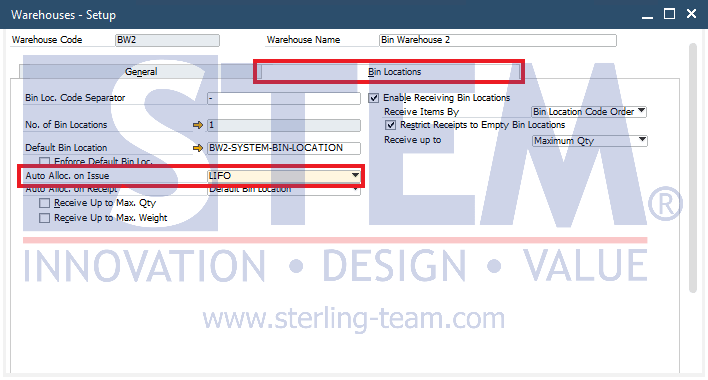
LIFO Setup in Bin Locations
To enable LIFO allocation for goods issue, follow these steps:
- Go to Administration > Setup > Inventory > Warehouses
- Select the warehouse that manages the desired Bin Locations
- Click the Bin Locations tab
- In the Auto Alloc. on Issue section, choose LIFO
How the System Determines the Bin?
When a goods issue transaction is performed:
- The system reads the Last Received Date of each bin
- The bin with the most recent date is prioritized
- If multiple bins have the same date → selection is based on bin code
- Stock is allocated until the required quantity is fulfilled
Scenario Examples
Scenario 1: Latest Stock Priority
| Posting Date | Bin Location | Quantity |
|---|---|---|
| 18 Mar 2026 | Bin A | 150 |
| 23 Mar 2026 | Bin B | 80 |
If 60 units are issued, the system will take from Bin B
Explanation:
Although Bin B has a smaller quantity, it is prioritized because it has the most recent date (23 Mar).
Scenario 2: Same Dates Across Multiple Bins
| Posting Date | Bin Location | Quantity |
|---|---|---|
| 25 Mar 2026 | Bin A | 70 |
| 25 Mar 2026 | Bin B | 90 |
| 25 Mar 2026 | Bin C | 60 |
If 100 units are issued, the system will take 70 units from Bin A and 30 units from Bin B (based on bin code order).
Explanation:
Since all dates are the same, the system follows the alphabetical order of bin codes (A, then B).
Scenario 3: Impact of Stock Updates Within a Bin
| Posting Date | Bin Location | Quantity |
|---|---|---|
| 16 Mar 2026 | Bin D | 100 |
| 19 Mar 2026 | Bin E | 120 |
| 24 Mar 2026 | Bin D | 40 |
Final condition:
- Bin D: 24 Mar 2026
- Bin E: 19 Mar 2026
If 130 units are issued, the system will:
- Take 40 units from Bin D
- Then take 90 units from Bin E
Explanation:
Even though Bin D contains older stock (16 Mar), the new receipt on 24 Mar causes the entire bin to be treated as the most recent stock.
Important Notes
- Ignore Quantity: Priority is not based on the largest stock quantity, but on the most recent date.
- Dynamic Changes: A single new receipt can immediately change the overall bin priority order.
- No Layer Mixing: The system does not differentiate between old and new stock within the same bin; it only considers the bin’s latest receipt date as a whole.
The LIFO method provides an aggressive approach to moving the most recent stock. However, it is not recommended for perishable goods, as it may cause older stock to remain in the warehouse for too long, increasing the risk of expiration.
Also read relevant SAP Business One Tips:
- How to Set Default Bin Location in SAP Business One
- FIFO Bin Location in SAP Business One Issue Transactions
- Fix Bin Location Activation Error in SAP B1
- How to Manage Drop Ship Warehouse in SAP B1
- Bin Location Transaction Restriction in SAP Business One
- How to Return Issued Components in Production Order