PT Sterling Tulus Cemerlang
www.sterling-team.com

Whatsapp
+62-877-8655-5055

Email
sales-enquiry@sterling-team.com

Address
Sampoerna Strategic Square
South Tower Level 30
Jl Jend. Sudirman No. 45-46
Jakarta 12930 – Indonesia

600+ FREE Tips SAP Business One for you to Become SAP B1 Super User from Sterling Tulus Cemerlang (STEM)

SAP B1 User Defined Tables Auto Increment Enhancement

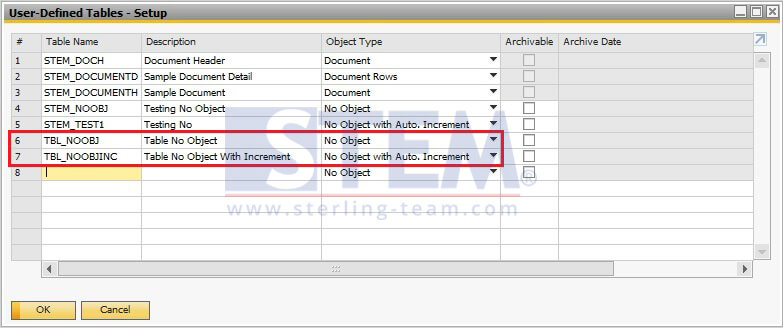
In the User Defined Tables – Setup window a new object type ‘No Object with Auto Increment’ is added in the drop-down list of the Object Type field. When you apply this type, the application created a user defined table with two fields Code and Name.

Go to menu: Tools – Customization Tools – User-Defined Tables-Setup
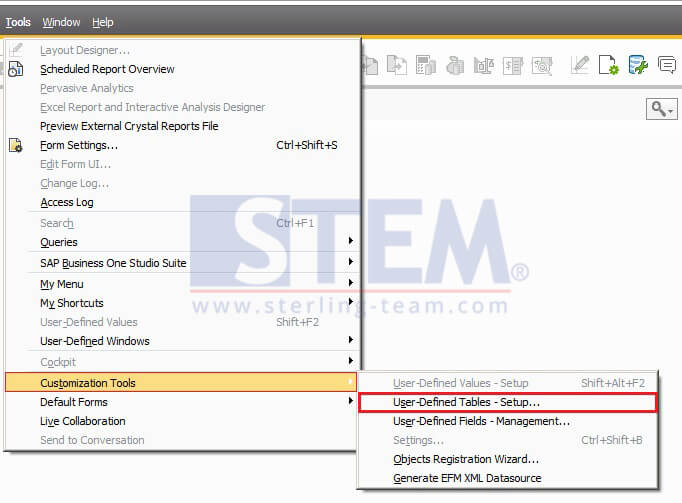
SAP_BusinessOne_Tips-STEM-Enhancement on User Defined Tables SAP B1_03

SAP_BusinessOne_Tips-STEM-Enhancement on User Defined Tables SAP B1_01

With the sample on the picture above, look for table TBL_NOOBJ & TBL_NOOBJINC.
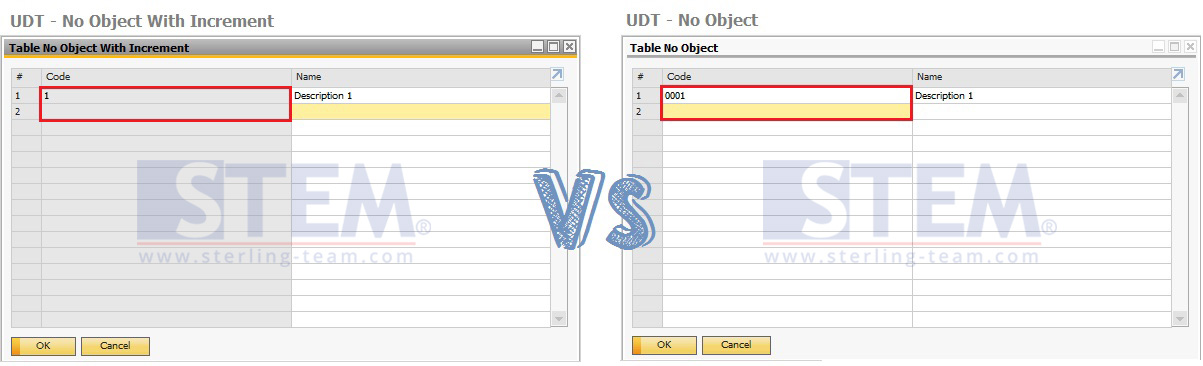
SAP_BusinessOne_Tips-STEM-Enhancement on User Defined Tables SAP B1_02

The Code field is auto-increasing, therefore no need for manual input by the user. As we know, before patch level 04, when create a new table, you still need to input the unique code by yourself. But, with this new feature, you can save a lot of your time for creating a user-defined tables, fields, etc.

NOTES: Only available on SAP B1 Version 9.2 Patch Level 04 and above

Also read relevant SAP Business One Tips:

Run Your Business With The Piece of Mind Using SAP Business One

This article was written by PT. Sterling Tulus Cemerlang
More details about SAP Business One,
email to: sales-enquiry@sterling-team.com or call +6221-5806336 or wa +6287786555055

, , ,