
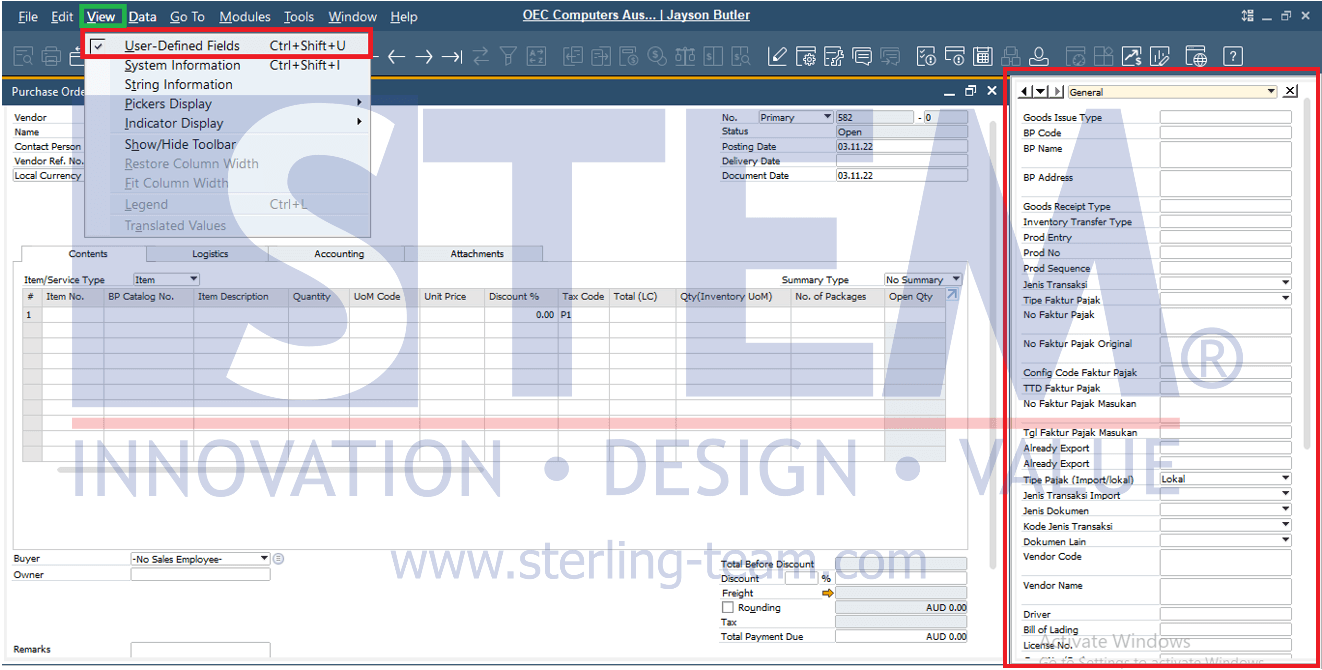
User Defined Field (UDF) are typically used when additional fields are needed in a document. Users can view the added UDFs by displaying the UDF window on the right side of the transaction screen. Here’s how to show or hide the UDF window:
- Open a transaction document that contains additional UDFs.
- To show the UDF window, go to View > User-Defined Fields or use the shortcut CTRL + SHIFT + U.
- The UDF window will then appear on the right side of the transaction screen.
Also read relevant SAP Business One Tips:
- Disable User-Defined Field in SAP Business One
- How to Adjust Small Text in SAP Business One
- How to Deactivate a Warehouse in SAP Business One
- How to Add an Open Sales Orders Shortcut in SAP B1 Web Client
- Set Default Currency & Hide All Currencies in SAP B1
- Disable “Display Inbox When New Message Arrives”