When you do business with your customers, some of them don’t allow you to do partial delivery.
There are 2 options to prevent this kind of errors when delivering goods to the customer. One of them is by using the feature that has been provided on business partner master data.
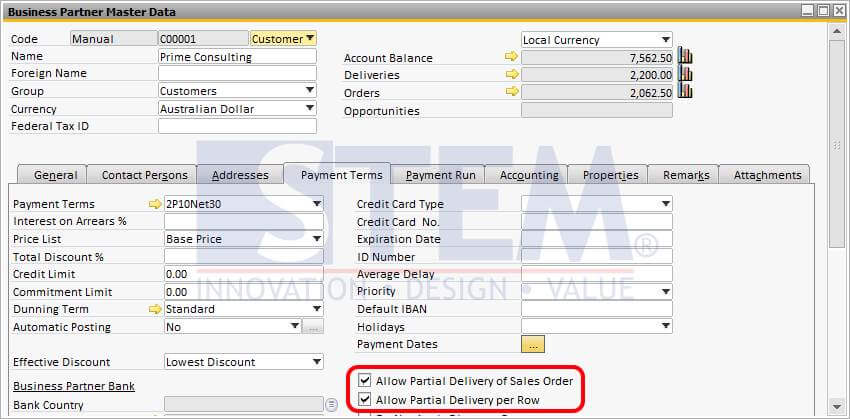
Allow Partial Delivery of Sales Order :
- When selected, it will allow partial copying of rows from a sales order to a target document.
- When deselected, you must copy the complete sales order to a target document
Allow Partial Delivery per Row :
- When selected, it will allow partial copying of quantity from a sales order to a target document.
- When deselected, you must copy all items in a row from a sales order to a target document.
Need to Prevent Partial Deliveries in SAP B1?
Incorrect settings can lead to unintended partial deliveries. Our team can help configure SAP Business One to match your business and customer delivery requirements.
Also read relevant SAP Business One Tips:
- Locked Function in Warehouse List of Item Master Data
- How to Check Item Stock Availability in SAP Business One
- How to Define Item Groups in SAP Business One
- Enhanced BOM Description Update in SAP Business One v10
- FIFO Bin Location in SAP Business One Issue Transactions
- Re-activate Items in SAP Business One – Step-by-Step