If you have already executed a Depreciation Run, and after a few months you realize there was a mistake in the assets that have been depreciated, you can still cancel the process and repost it. Here are the steps to cancel a Depreciation Run:
- Go to Financials > Fixed Assets > Depreciation Run.
- In the Previous Depreciation Runs table, select the row you want to cancel, right-click, and choose Cancel.
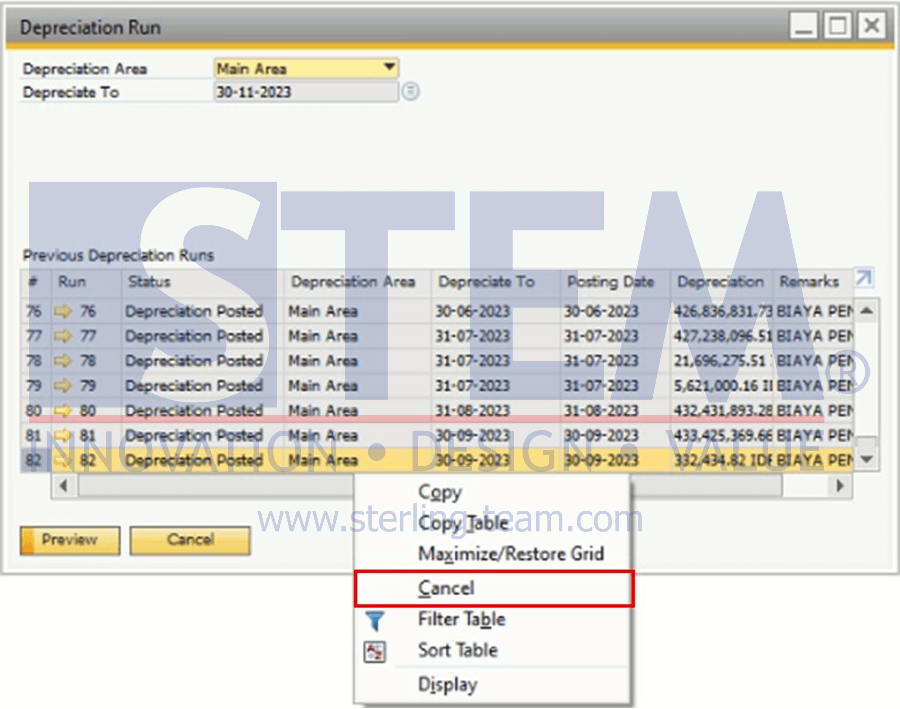
The cancellation process can only be done in sequence, starting from the most recent Depreciation Run until you reach the month you want to cancel. Example: If the last Depreciation Run was executed up to October, and you want to cancel the depreciation for July, you must cancel depreciation from October → September → August, and then you can cancel July.
Need to Cancel a Depreciation Run?
Asset or depreciation issues are often discovered only after the Depreciation Run has been completed. Our team can help analyze the root cause and recommend the right corrective steps.