If you have already executed a Depreciation Run, and after a few months you realize there was a mistake in the assets that have been depreciated, you can still cancel the process and repost it. Here are the steps to cancel a Depreciation Run:
- Go to Financials > Fixed Assets > Depreciation Run.
- In the Previous Depreciation Runs table, select the row you want to cancel, right-click, and choose Cancel.
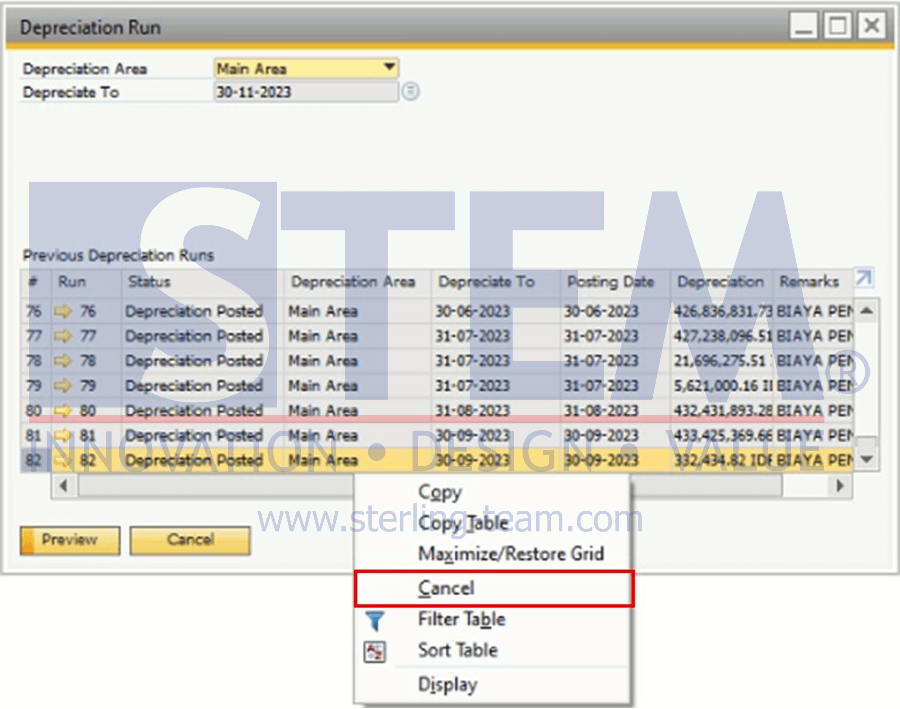
The cancellation process can only be done in sequence, starting from the most recent Depreciation Run until you reach the month you want to cancel. Example: If the last Depreciation Run was executed up to October, and you want to cancel the depreciation for July, you must cancel depreciation from October → September → August, and then you can cancel July.