





When running SAP Business One, it’s very common for Clients Company to set different authorization for one and another department. Especially, for non-accounting & finance department, account balance and business partner balance must be only shown for them, and hidden for another department.
This issue is really important to the company itself for company credential purpose
This is how to do it:
- You must create authorization group In Module Administration → System Initialization → Authorizations → Authorization Groups
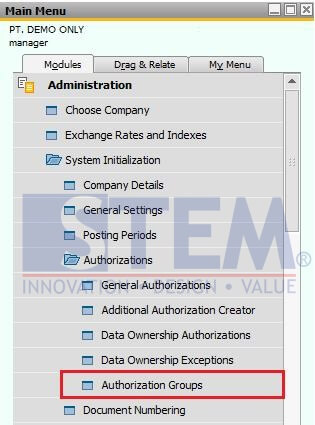
For details please visit this link: https://www.sap-business-one-tips.com/en/2016/07/14/authorization-group/
- After create authorization group, open menu “General Authorization” in Administration → System Initialization → Authorizations → General Authorization
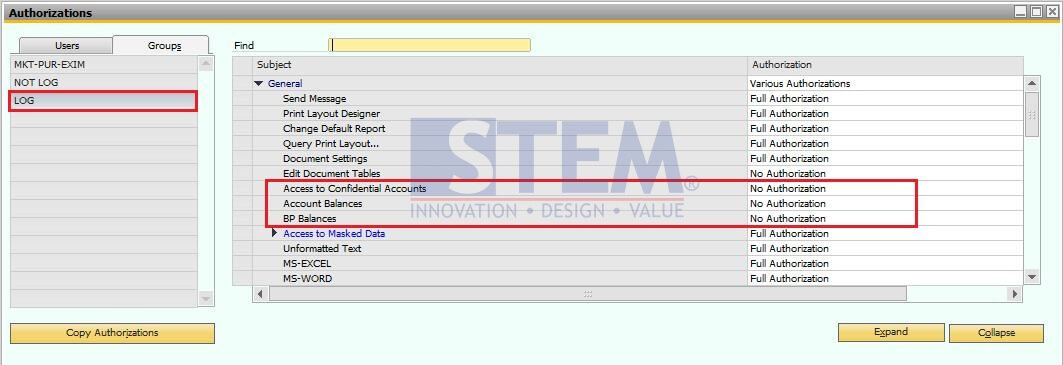
Select the “non-accounting & finance group”, and set “No Authorization” in Subject:
> Access to Confidential Accounts
> Account Balances
> BP Balances
- And click “Update” Button
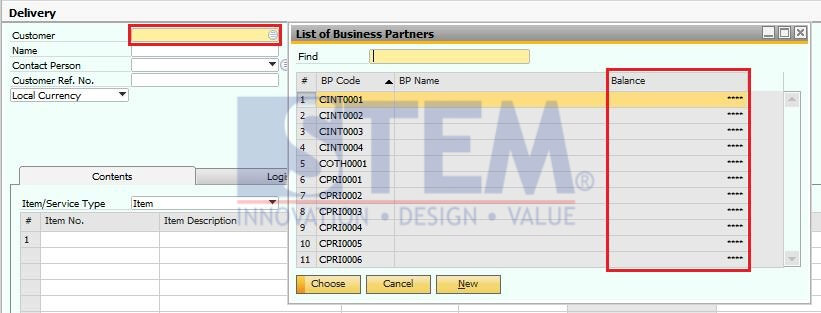
- So, after you set authorization, user on authorization group “LOG” will not see the balance, and also when they open Choose From List screen, that will be show only *****.
Hope this helpful.
Copyright © PT Sterling Tulus Cemerlang – 2016
Also read relevant SAP Business One Tips:
- How to Set SAP Business One Control Account – Guide
- How to Depreciate Assets in SAP Business One – Quick Guide
- Automate Closing Period in SAP Business One
- Fixing Permission Error in SAP B1 Customer Aging Report
- Cancel Landed Cost in SAP Business One: Step-by-Step
- Decimal Display Format in SAP Business One – Customize Numeric Precision





