A user in SAP Business One is used as an account to access and perform activities in the system. Each user can have different licenses, authorizations, and settings based on their needs and responsibilities.
By having separate users, the company can control who can access certain functions, perform transactions, or modify data in SAP B1. Users also help identify who performed a particular activity or transaction in the system.
How to Create a User
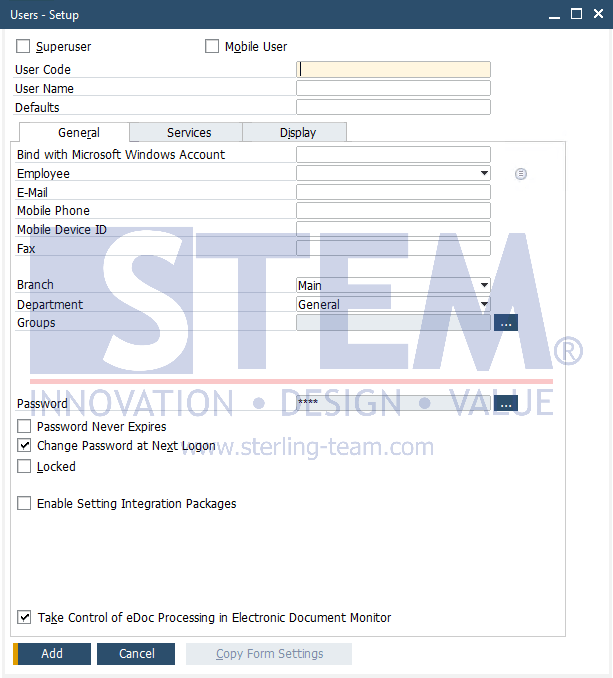
To create a new user, go to Administration > Setup > General > Users. Then, enter the required user information.
1. Enter User Information
On the General tab, there are several main fields to consider:
- User Code – the unique code used to log in. It is case sensitive and cannot be changed after it has been saved.
- User Name – the user’s name displayed in SAP Business One.
- Employee – can be linked to an Employee Master Data record that is not yet linked to another user.
- Branch / Department – specifies the user’s branch and department, if required.
- Password – the initial password for the user. To enter the password, click the three-dot button and enter the desired password. The password strength follows the settings configured in Password Administration. These settings are explained in the article Custom Password Security for SAP Business One Users.
- Password Never Expires – the user’s password will not expire. The user will not be required to change the password periodically.
- Change Password at Next Logon – the user will be required to create a new password the next time they log in. This is commonly used after an administrator creates or resets a user’s password.
- Locked – locks the user so they cannot log in to SAP Business One. This checkbox can be used to disable a user’s access without deleting the user.
2. Define the User Type
Several options are available:
- Superuser – has access to all windows and functions in SAP Business One and can manage authorizations for other users.
- Mobile User – allows the user to access company data through a mobile device.
- Support User – used for support or consulting purposes and does not require a license to access the system.
Tip: Do not assign Superuser status without careful consideration. It should only be given to users who require full access.
3. Services Tab
The Services tab is used to configure processes or checks that are automatically performed when the user starts working with SAP Business One.
4. Display Tab
The Display tab is used to configure the SAP Business One interface for the user, such as language, font, skin style, and background.
Additional Settings
Assign License
After creating the user, assign a license based on the user’s requirements. From the Users – Setup window, click Licenses, or go to: Administration > License > License Administration. Then, assign the appropriate license to the user.
Set Authorization
After assigning the license, configure the user’s authorization by clicking Authorizations in the Users – Setup window, or go to: Administration > System Initialization > Authorizations > General Authorizations. Authorization should be assigned based on the user’s responsibilities. Not every user needs Full Authorization.
With these settings, each user can access and use SAP Business One according to the license and authorizations assigned to them.