
In the sales process or delivery planning, one of the most common questions is: is the requested item actually available for delivery?
The stock shown in the warehouse is not always fully available for use. Some quantities may already be allocated to other orders, in the production process, or scheduled for delivery to other customers.
To address this, SAP Business One provides the Available-To-Promise (ATP) feature.
What is Available-To-Promise (ATP)?
Available-To-Promise (ATP) is a report that displays the availability of an item in a specific warehouse over time, taking into account both existing and planned transactions.
Through this report, users can see:
- Current available stock in a specific warehouse
- Stock already allocated to other transactions
- Items ordered by customers but not yet delivered (Committed)
- Incoming stock from purchasing or production (Ordered)
- Estimated timing of future stock availability
Therefore, ATP helps users determine when an order can be fulfilled.
How to Access Available-To-Promise
The Available-To-Promise report can be accessed directly from transaction documents that contain items, such as:
- Sales Quotation
- Sales Order
- Delivery
- Production Order
- and other inventory-related documents
Steps to open the ATP report:
- Open a transaction document that contains item rows (e.g., Sales Order).
- Right-click on the item row you want to check.
- Select Available-To-Promise.
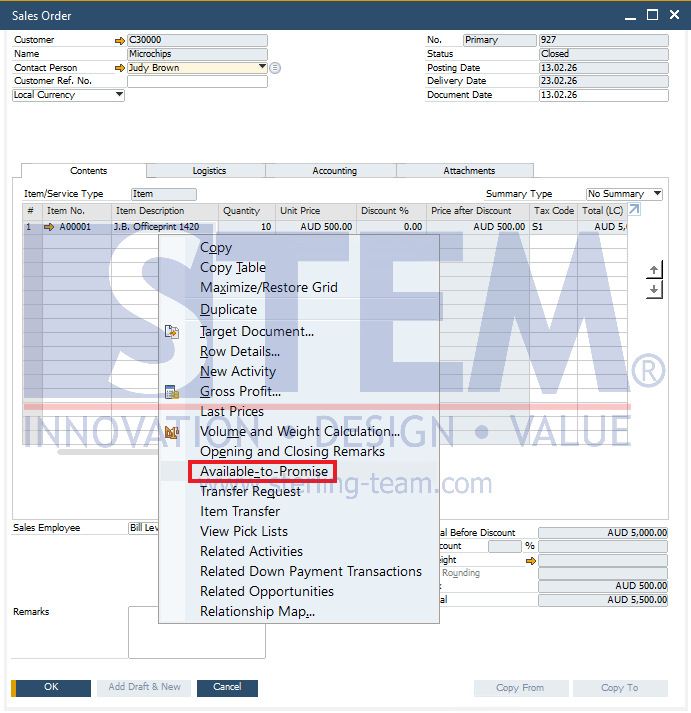
SAP Business One will then display a report showing the availability of the selected item.
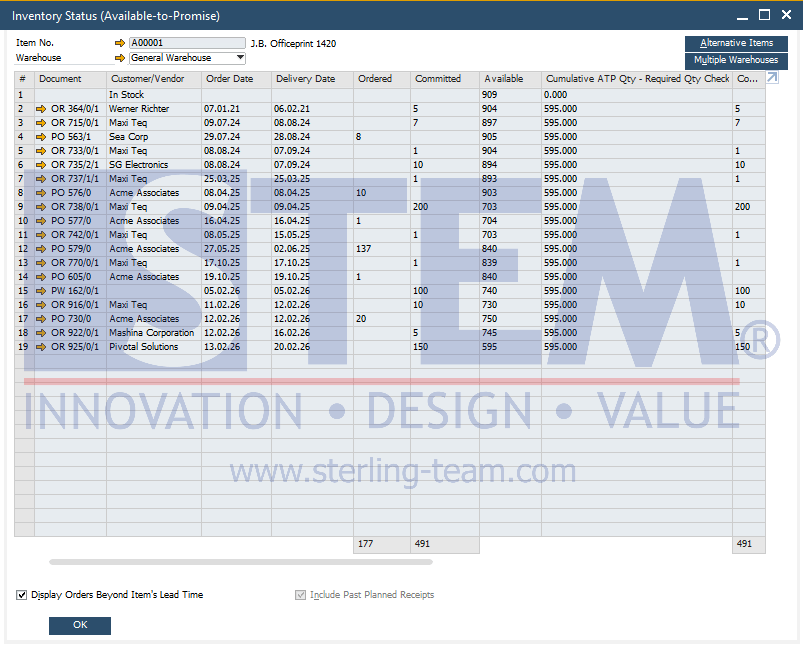
This report displays the stock movement of an item in a specific warehouse, based on transactions that affect its availability, both incoming and outgoing.
Each row represents a document or transaction related to the item, such as Sales Orders, Purchase Orders, or Production Orders.
How to Read the ATP Report
Based on the example shown:
- The In Stock row represents the initial available stock.
- When there is a Sales Order, the Committed column will be updated, reducing the value in the Available column.
- If there is a Purchase Order, the quantity in the Ordered column will increase the stock on the expected receipt date.
- In this example, the initial stock is 909. After considering committed quantities (outgoing orders) and incoming stock from purchasing and production up to February 2026, the final truly available stock (Available) is 595.
By reading the report chronologically based on dates, users can understand:
- when stock will decrease
- when stock will increase
- whether an order can still be fulfilled
Additional Tips
- Check Other Warehouses: Click the Multiple Warehouses button in the top right corner to check stock availability in other warehouse locations.
- Alternative Items: If the stock is not available, click Alternative Items to find substitute items with similar functions.
Available-To-Promise (ATP) is an essential feature in SAP B1 for checking stock availability more accurately. Unlike simply viewing the current stock quantity, ATP considers all relevant transactions that affect inventory. This allows users to determine whether an order can truly be fulfilled and when the item will be available.
By using this report, companies can provide more accurate information to customers, avoid stock allocation conflicts, and improve delivery and procurement planning.
Stock Available, But Not Ready to Sell?
Visible inventory is not always available for customer orders. Our team can help you optimize Available-To-Promise (ATP) to improve inventory visibility and delivery planning.