
SAP Business One provides you a feature where you can make some of the Accounts you have to be Confidential. It means only authorized users will be able to see it.
To make your account confidential access the menu:
Financials > Chart of Accounts
Select the Account that you want to set as Confidential, then tick box ‘Confidential’
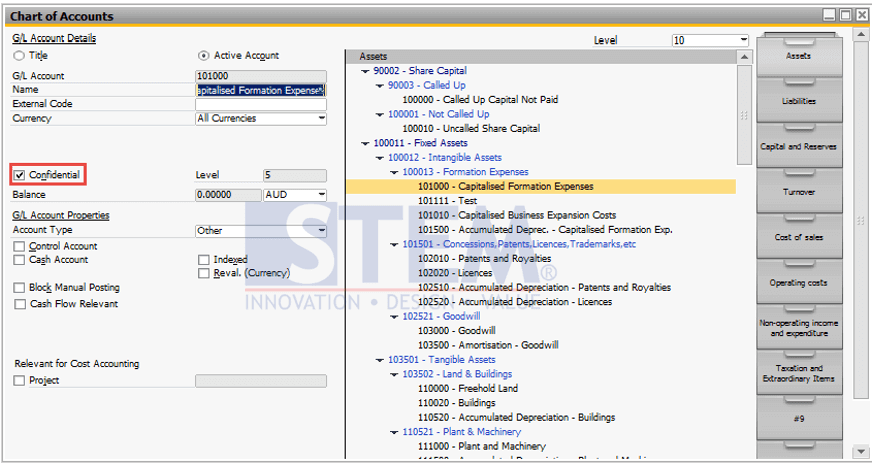
After that, click the Update button.
In order to set some users so they can’t see the Confidential Account, you have to go to
Administration > System Initialization > Authorizations > General Authorizations.
Then select the user that you want to forbid, by:
Clicking General > Access to Confidential Account > Set as ‘No Authorization’.
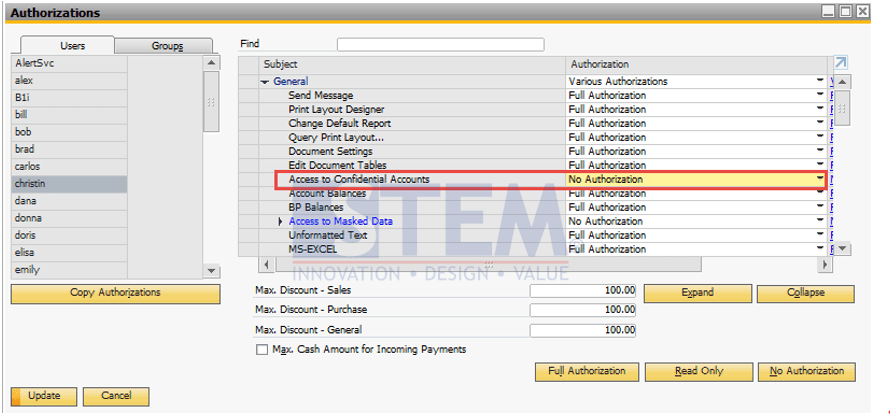
After you’ve finished setting up the authorization click Update Button.
Note that this setting will affect the restricted user:
- Accounts marked as ‘Confidential’ are not displayed in CoA.
- Accounts marked as ‘Confidential’ are not displayed in the ‘Choose from’ lists.
- Accounts marked as ‘Confidential’ are not displayed in any of the financial reports (Profit and Loss, Trial Balance, Balance Sheet).