In warehouse management using Bin Locations in SAP Business One, one of the main challenges is determining which bin to pick items from when performing goods issue transactions (such as Goods Issue, Delivery, and other issue transactions). To automate this process, the system provides the FIFO (First-In, First-Out) method. SAP Business One has this feature/functionality as a warehouse management system (WMS).
However, it is important to understand that:
FIFO at the Bin Location level is not calculated based on the sequence of all incoming transactions, but rather based on the Last Received Date of each bin.
FIFO Settings for Bin Locations
The allocation method for goods issues can be configured as follows:
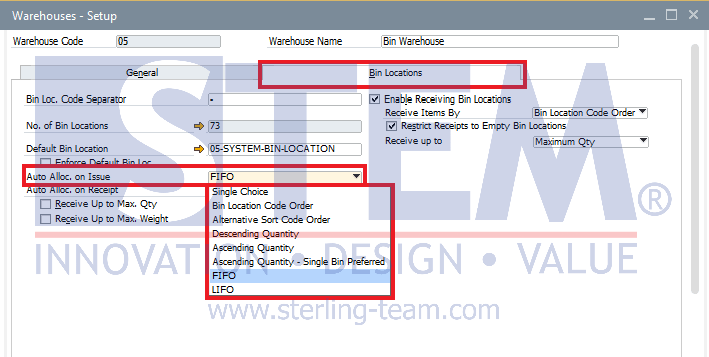
- Go to Administration > Setup > Inventory > Warehouses
- Find the warehouse code that uses Bin Locations and needs allocation setup
- Navigate to the Bin Locations tab
- In the Auto Alloc. on Issue field, select FIFO
How the FIFO Method Works
When a goods issue transaction occurs, the system will:
- Identify the Last Received Date of each bin
- Sort bins starting from the oldest date
- If multiple bins have the same Last Received Date, the system uses the Bin Location Code (alphabetical/numerical order) to determine priority
- Allocate quantities until the required issue quantity is fulfilled
Case Simulations
Below are simulations of how the method works in different scenarios:
Case 1: Different Receipt Dates
This is the basic FIFO scenario. A Goods Receipt is posted for Item A.
| Posting Date | Bin Location | Quantity |
|---|---|---|
| 21 Mar 2026 | Bin 3 | 100 |
| 22 Mar 2026 | Bin 2 | 200 |
If a goods issue of 50 units is made, the system will take from Bin 3. This is because Bin 3 has the oldest receipt date (21 Mar 2026), making it the first priority according to FIFO principles.
Case 2: Same Receipt Date (Tie Condition)
If goods are received into different bins on the same date, the system cannot determine priority based on time of entry. Instead, it uses the bin code.
| Posting Date | Bin Location | Quantity |
|---|---|---|
| 22 Mar 2026 | Bin 3 | 100 |
| 22 Mar 2026 | Bin 2 | 200 |
If a goods issue of 50 units is made, the system will take from Bin 2. Since the receipt dates are the same, the system does not consider transaction time or entry sequence. Instead, it follows the bin code order, where Bin 2 comes before Bin 3.
Case 3: Last Received Date Update
This is a critical point. The FIFO status of a bin is reset or updated whenever new stock is received into that bin.
| Posting Date | Bin Location | Quantity |
|---|---|---|
| 19 Mar 2026 | Bin 3 | 50 |
| 20 Mar 2026 | Bin 2 | 100 |
| 22 Mar 2026 | Bin 3 | 100 |
Final Condition:
- Bin 2: Last Received Date = 20 Mar 2026
- Bin 3: Last Received Date = 22 Mar 2026 (terupdate)
If a goods issue of 120 units is made:
- The system takes 100 units from Bin 2
- Then continues by taking 20 units from Bin 3
Even though Bin 3 still contains older stock from March 19, the new receipt on March 22 causes the entire bin to be considered “newer.” As a result, FIFO priority shifts to Bin 2.
Important Notes
- FIFO at the Bin Location level works per bin, not per stock layer within a bin
- Every new receipt updates the Last Received Date of the bin
- The system does not consider transaction input sequence
- When dates are the same, priority is determined by the bin code
Practical Tips
To maintain accurate FIFO behavior:
- Avoid mixing old and new stock in the same bin
- Use separate bins for different batches or stock ages
- Pay attention to bin naming, as it affects allocation order
- Educate warehouse staff that adding new stock into an existing bin will change FIFO priority
Is SAP B1 FIFO Bin Allocation Not What You Expected?
A new stock receipt can change a bin’s FIFO priority. Understand how it works and consult our team about your warehouse configuration.