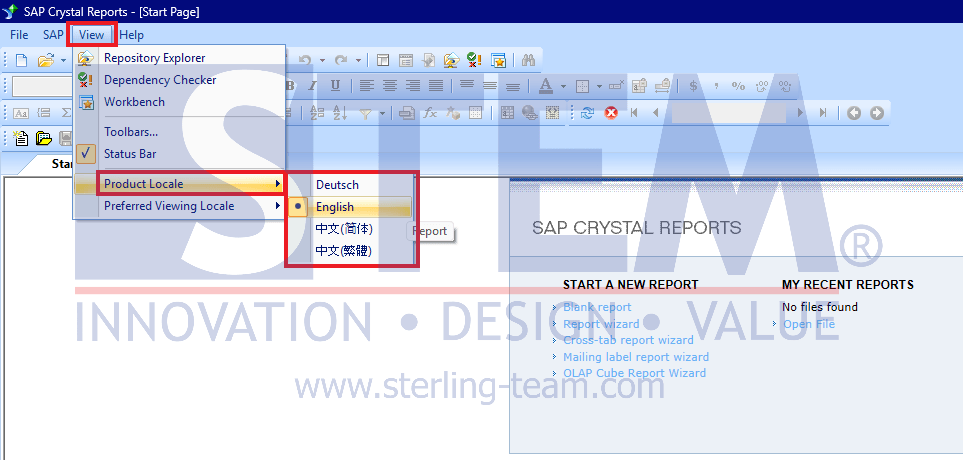
In today’s global business environment, the need to present reports in multiple languages has become increasingly important. Companies not only operate locally but also serve users from different countries with varying language preferences. To address this need, SAP Crystal Reports provides a Supported Language feature that enables flexibility in application interface language, as well as supports localization processes such as date, number, and currency formats.
What is Supported Language?
Supported Language in SAP Crystal Reports is used to:
- Display the application interface, such as menus and dialog boxes, in a specific language
- Support the report design process using a local language
- Enable report data localization based on end-user preferences (user localization)
With additional configurations such as parameters and formulas, a single report design can be used to display reports in different languages. This approach helps avoid creating multiple versions of the same report and simplifies report management.
Language Support Development
In its earlier versions, SAP Crystal Reports only supported 12 languages. As global business needs evolved, this number has significantly increased starting from version 2020. Currently, SAP Crystal Reports supports 28 languages, including the addition of 16 new languages to expand its global coverage.
- Arabic
- Chinese (Simplified)
- Chinese (Traditional)
- Czech
- Danish
- Dutch
- English
- Finnish
- French
- German
- Hungarian
- Italian
- Japanese
- Korean
- Norwegian
- Polish
- Portuguese (Brazil)
- Russian
- Slovakian
- Spanish
- Swedish
- Thai
- Turkish
- Hebrew
- Kazakh
- Romanian
- Slovenian
- Ukrainian
Important Notes
There are some limitations regarding language support in certain viewers:
- Crystal Report versi 2020 – Arabic, Hebrew, Ukrainian, and Kazakh are only supported in the Crystal Reports DHTML Viewer when using Internet Explorer and Firefox.
- Crystal Report versi 2025 – Arabic is only supported in the Crystal Reports DHTML Viewer when using Firefox.
How to Install Language Packs
Additional languages in SAP Crystal Reports are not always installed by default. They can be installed during intial installation or through a Repair Installation, by selecting the required languages in the “Select Language Packages” dialog.
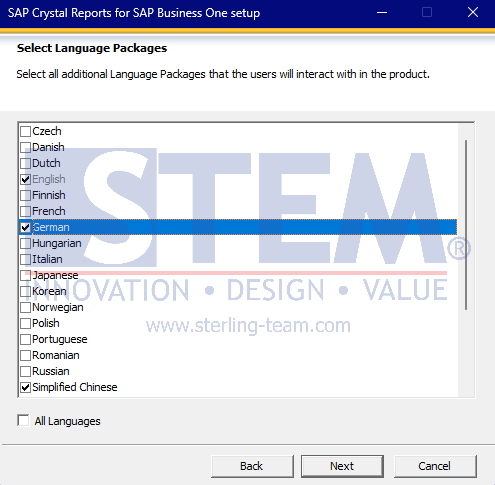
How to Change Language in SAP Crystal Reports
After installation, the language can be changed directly within the application:
- Open SAP Crystal Reports
- Go to View > Product Locale
- Select the desired language
The available languages in this menu will depend on the language packs selected during installation.