
SAP Business One has a feature to add one or more fields to the system which can be called UDF. In addition, we can change the number of characters in the UDF that we have created. In this article, we will explain how to add characters to a previously created UDF. Here are the steps:
- Select Tools > Customization Tools > User-Defined Fields – Management.
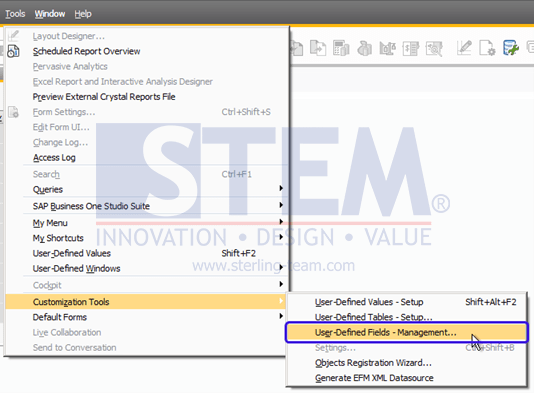 SAP Business One Tips – How to Extend a Character in Existing UDF
 - Find a UDF that has been created previously and you want to increase the character length, then press Update.
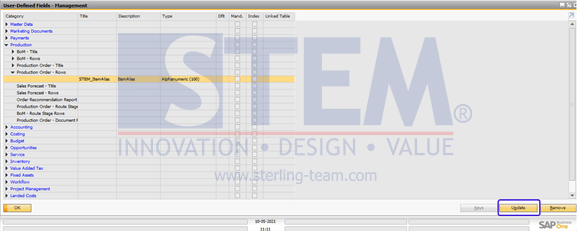 SAP Business One Tips – How to Extend a Character in Existing UDF
 - The Field data window will appear for information about the UDF you created.
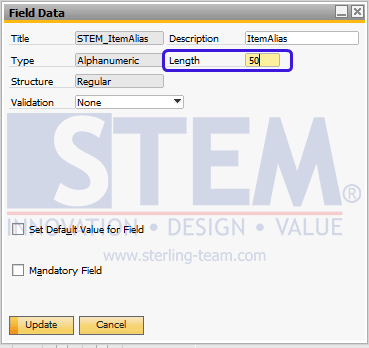
SAP Business One Tips – How to Extend a Character in Existing UDF
- that, a warning screen will appear that the change means changing the database, which means all windows will be closed for the process. Select the Yes button if you want to continue.
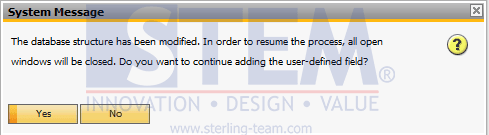
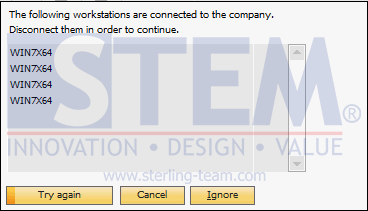
- A warning screen appears if a user is still connected to the database. Make sure no transactions are being made in the system. If it is confirmed, then click “Try again” or “Ignore” to continue the update process.
SAP Business One Tips – How to Extend a Character in Existing UDF
Note: It is recommended to do this update when the system is not in use or there are no transactions so that there are no problems with the ongoing transactions.
Also read relevant SAP Business One Tips:
- How to Restart SLD in SAP Business One (SQL Server)
- Setup Additional Authorization Creator in SAP B1
- How to Configure SBO Mailer in SAP B1 – Step-by-Step
- Running SSR Manual Upload in SAP Business One
- How to Hide Unused Layout in SAP Business One Easily
- How to Install Coresuite Add‑On for SAP Business One