Sometimes, as an internal IT staff or a SAP consultant, you need to access Remote Support Platform for doing some common task, such as: checking DB consistency, backup DB, etc.
If you want to use Remote Support Platform SAP Business One but you forget the User ID and password, here is some tips to find the user ID.
How about your forgotten password?
Don’t worry, after you found the user ID, you can easilly change your password
Also read:
By using “Forget Password” from Menu Login Screen.
- On SAP Business One Server, go to Remote Support Platform installation Folder.
C:Program Files (x86)SAPRemote support platform for SAP Business OneServiceConfig - Open File “RSP.Agent.Service.Config.Users.config” with Notepad
- Find <Property Group name..>.
See screenshot below :
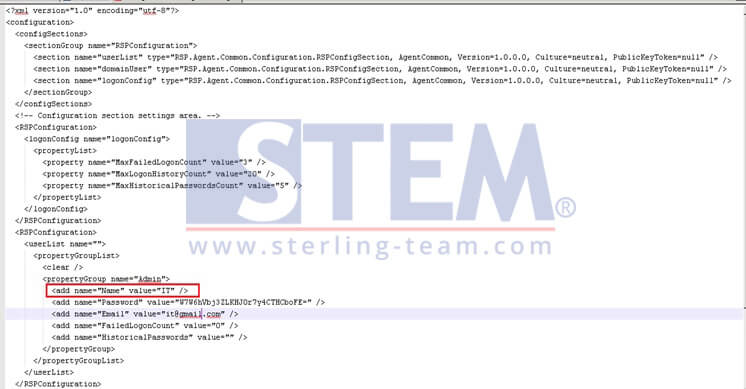
Find Your RSP User ID (sample)
- As see on Red Line Box, The user ID is IT.
- Then you can Login to Remote Support Platform with user ID= IT