
Companies sometimes need to evaluate how SAP is being used by their users. This evaluation aims to see how many users are truly active and how often they access the system. This information is important because the number of active users is directly related to the licensing costs that the company must pay.
With a User Action Log, a company can:
- Identify users who rarely or never log into the system.
- See which users are active on a daily basis.
- Track when users last logged in and how long they used SAP.
This data helps management make better decisions, such as whether to reduce unused licenses or adjust the total number of licenses for greater efficiency. In this way, operational costs can be optimized without disrupting business needs.
Below is a simple query that can be used to generate a User Action Log report in SAP HANA:
SELECT
   T0."Date" AS "Date",
   T0."Time" AS "Logged On",
   LPAD(FLOOR(T0."AliveDurtn" / 60), 2, '0') || ':' ||
   LPAD(MOD(T0."AliveDurtn", 60), 2, '0') AS "Time Logged on (hh:mm)",
   T0."LogoutTime" AS "Logged Off",
   T0."UserID",
   T0."WinUsrName",
   CASE T0."Action"
      WHEN 'C' THEN 'Created'
      WHEN 'D' THEN 'Superuser Deselected'
      WHEN 'F' THEN 'Logon Failed'
      WHEN 'I' THEN 'Logon Succeeded'
      WHEN 'L' THEN 'Locked'
      WHEN 'N' THEN 'Screen Unlock Failed'
      WHEN 'O' THEN 'Logoff'
      WHEN 'P' THEN 'Password Changed'
      WHEN 'R' THEN 'Removed'
      WHEN 'S' THEN 'Superuser Selected'
      WHEN 'T' THEN 'Temporary User Change'
      WHEN 'U' THEN 'Unlocked'
   END AS "ActionDesc"
FROM USR5 T0
WHERE T0."Date" >= ADD_MONTHS(CURRENT_DATE, -2)
ORDER BY T0."Date", T0."Time";
From the query above, the following query report will be generated:
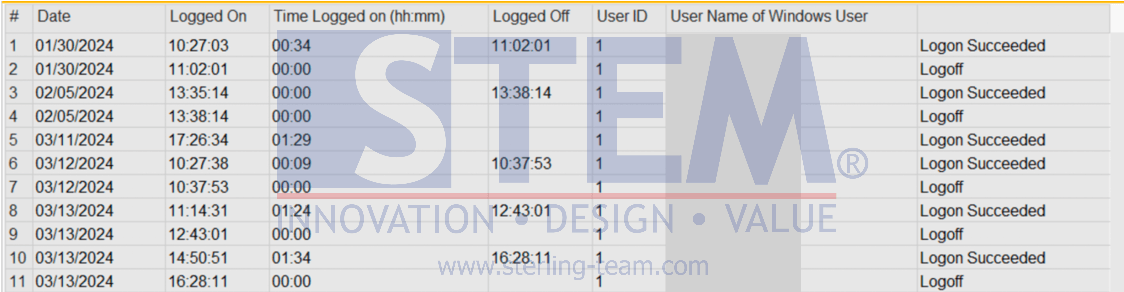
This report will display user activity records from the last two months, including login time, logout time, duration of usage, and the type of actions performed. With this information, companies can easily monitor SAP usage and ensure that licenses are utilized optimally.