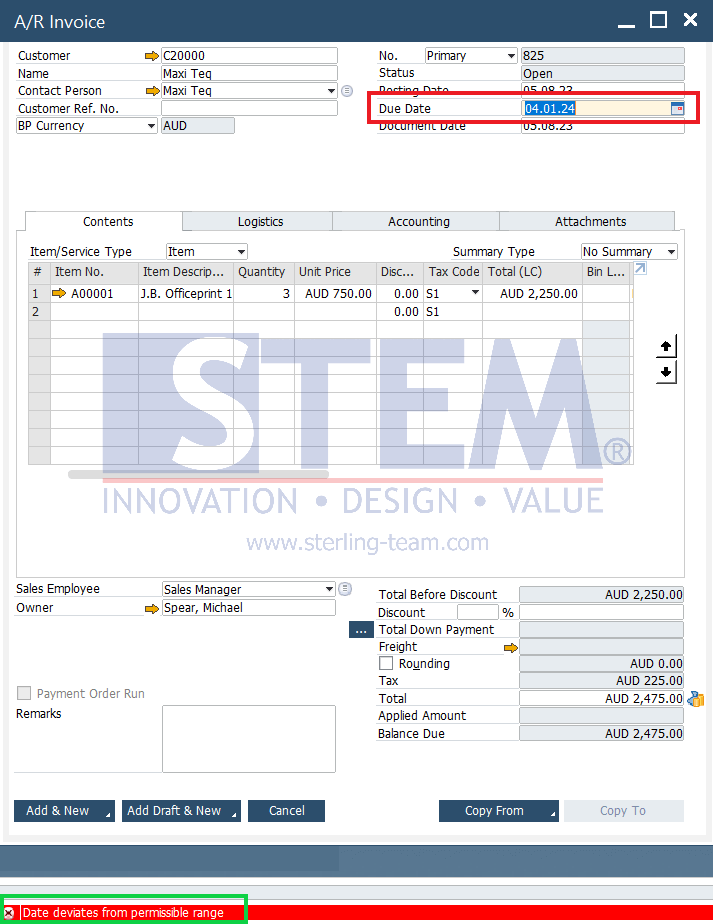
If a document has a date that is far from the Posting Period, an error will occur with the message “Date deviates from permissible range“. For example, several documents have a Due Date of up to 2024.
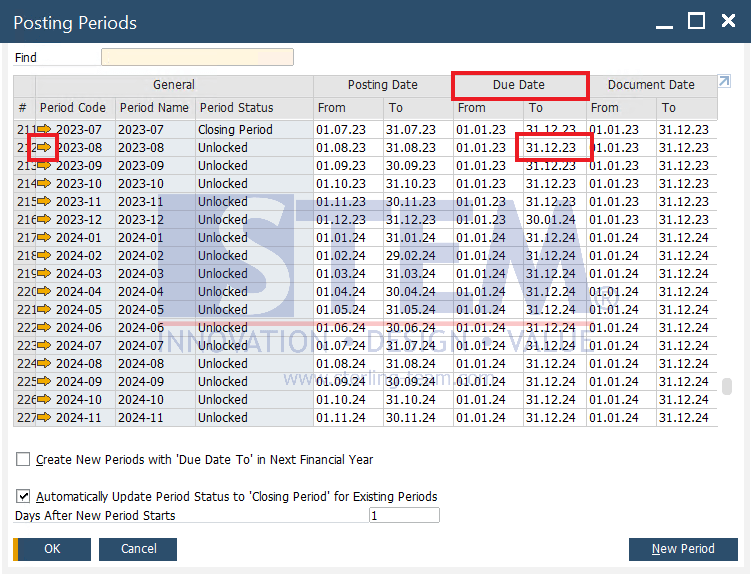
To be able to save documents with a Due Date condition that is far adrift from the Posting Date, it can be arranged through Posting Periods. Open the Posting Periods view via the Administration -> System Initialization -> Posting Periods menu. When the Posting Periods menu opens, set the Due Date by clicking on the Golden Arrow to change the Due Date to the desired date.
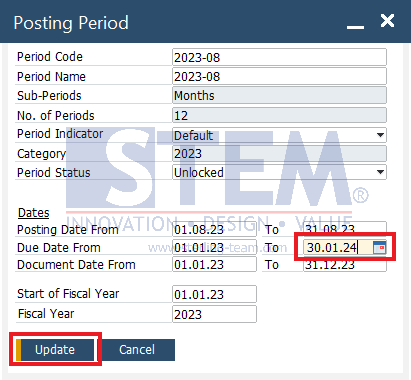
After changing the Due Date in the To section, click the Update button and the Due Date has changed according to the desired date. Then the Due Date of the document can already be made in 2024.
Also read relevant SAP Business One Tips:
- Fix “G/L Account Needs DR Assignment” Error in SAP B1
- Consider Reconciliation Date in SAP B1 General Ledger
- Limit Document Cancellation by Age in SAP Business One
- Fix Error When Previewing or Printing Crystal Report
- How to Copy Exchange Rates in SAP Business One
- How to Add Notes to Journal Entry in SAP Business One