





Sometimes in SAP Business One, when you want to choose a Business Partner or Items while creating a transaction document, you may or usually use ‘Choose From List’ option. But when you want to find the business partner or Items that you desire, basically SAP Business One will direct you to find the list by It’s code.
This is can be so troublesome sometimes because you may not remember the code but its description.
So what should you do?
SAP Business One can give Find by Description in Choose From List Window.
Here is the guide:
- If you see a small triangle icon is on Item No. / BP Code Column, it means you can find the Item/Business Partner by It’s Code.
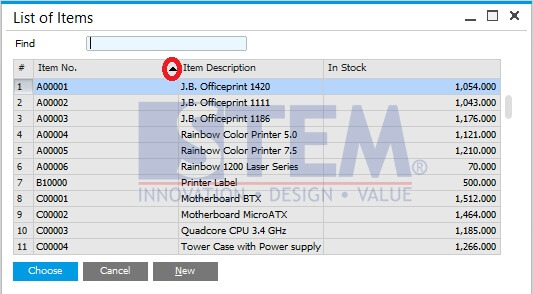
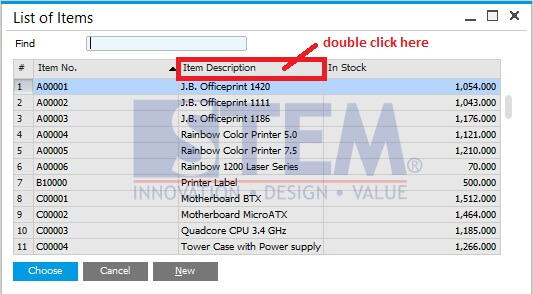
- So what you need to do is change the position of the triangle from Code Column into Description Column by double click on Item Description/BP Name Column.
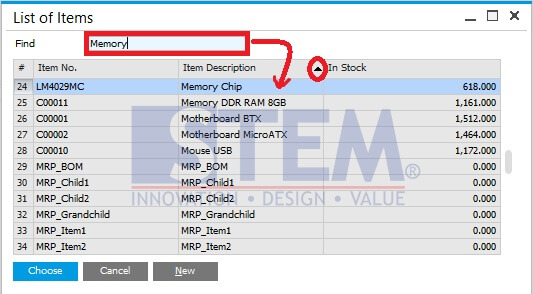
- And the result is triangle icon moved and you can find BP or Item by Description.
Copyright © PT Sterling Tulus Cemerlang – 2016
Also read relevant SAP Business One Tips:
- Set Search Result View in Choose From List SAP B1
- How to Deactivate a Warehouse in SAP Business One
- Set Default Currency & Hide All Currencies in SAP B1
- How to Reorder Document Columns in SAP Business One
- Attachments in SAP Business One: How It Works & Key Features
- Print Journal Voucher in SAP Business One: How-To Guide









