





Ever want to hide some unused menu / module ? Here’s the thing, you can simply hide them using Hide function tab.
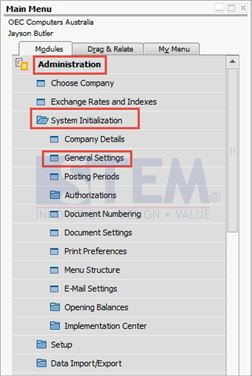
Go to Administration → System Initialisation → General Settings → Hide Functions tab.
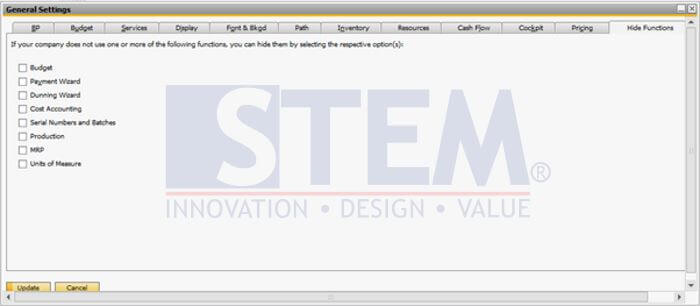
Select Unused menu which you want to hide and press update when you’re done.
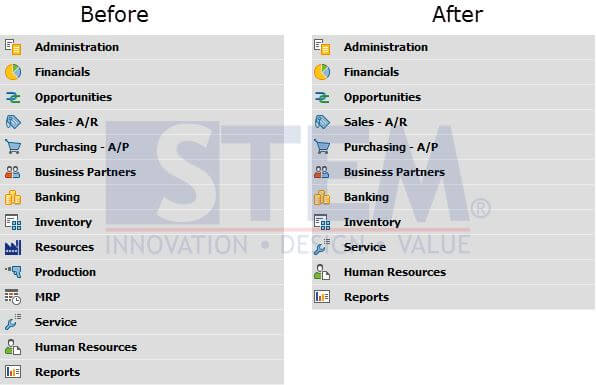
Is it permanent effect? What If you needed it someday? Simply untick the selection and the Menu will be back to your main menu. Here’s the illustration :
Copyright © PT Sterling Tulus Cemerlang – 2017
Also read relevant SAP Business One Tips:
- SAP B1 Delete Draft Error: Approval Process Restriction
- Good Issue with Bin Location & Negative Inventory
- How to Print SAP Business One Documents Automatically
- Form Authorization & Main Menu Settings Guide in SAP Business One
- SAP B1: Alternative to Choose Company Menu
- Sending SAP B1 Docs by Email via Document Printing









