




For transactional recording needs, SAP Business One provides 3 different dates:
- Posting Date.
This date is use to post the transaction journal to general ledger. For example, when we create Delivery for items, the document will create a journal entry at posting date that will affect Inventory GL Account and COGS GL Account. - Document Date.
This date is use as information when the document was created. In A/P Invoice, you can use this date to record when the invoice was originally created / sent by the vendor. - Due Date.
In Sales Order and Purchase Order, this date will be shown as delivery date, used to indicate the delivery time. But in Invoice documents, this date is use to indicate the payment due date.
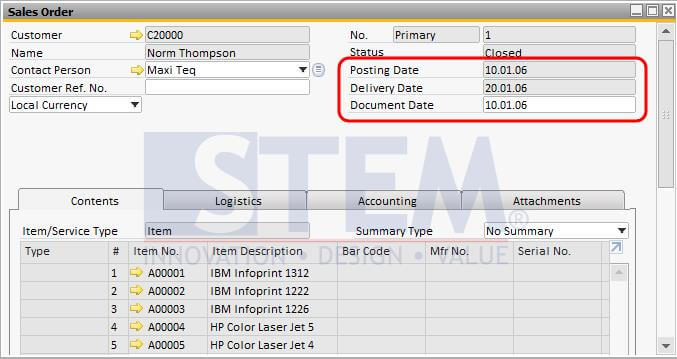
Fig 01. Dates in Sales Order Document
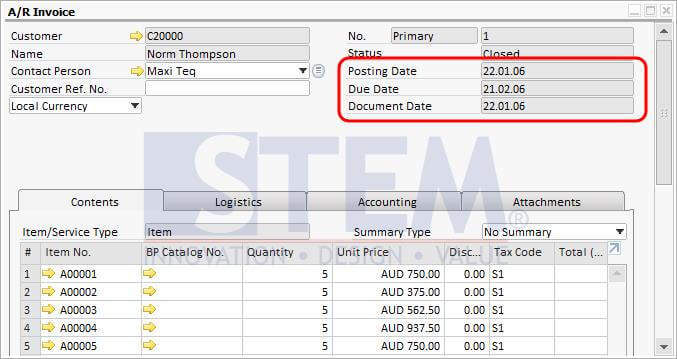
Fig 02. Dates in AR Invoice Document
Copyright © PT Sterling Tulus Cemerlang – 2017
Also read relevant SAP Business One Tips:
- SAP B1 Journal Entry Cash Flow Error Fix
- Allow Journal Entry Update in Locked Posting Period
- Rearranging Item Lines in SAP Business One Transaction Documents
- Auto-Create Equipment Cards in SAP Business One
- Efficient Bulk Document Emailing in SAP Business One
- Set Search Result View in Choose From List SAP B1









