
In today’s global business ecosystem, flexibility in transacting with multiple currencies is no longer optional, it is a necessity. SAP Business One provides the Currencies Setup feature to manage the various currencies used in company transactions. This feature ensures that all international transactions are recorded accurately and accountably.
Why Currency Setup is So Important?
When a company serves customers or collaborates with vendors from different countries, it inevitably deals with multiple currencies such as USD, EUR, SGD, and others.
Without proper configuration, companies may face several risks, including:
- Inaccurate Transaction Values: The risk of incorrect input values that do not align with the respective currency standards.
- Inconsistent Financial Reports: Difficulties in consolidating financial data during period-end closing.
- Exchange Rate Issues: Potential undetected exchange rate differences that may impact the company’s profit and loss.
To support these requirements, currencies can be added through the following menu: Administration > Setup > Financials > Currencies.
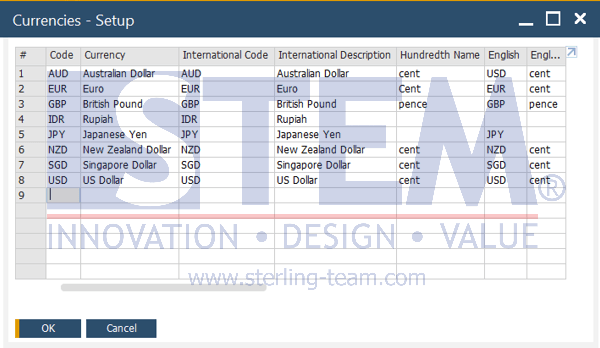
Main Functions of Currency Setup
Currency setup serves as a foundation within the financial module. Its key benefits include:
- Centralized Currency List: Provides an official list of currencies that can be used within the system.
- Multi-Currency Support: Allows transactions to be created in foreign currencies while remaining integrated with the local currency.
- Exchange Rate Basis: Serves as a reference for the Exchange Rates and Indexes menu to maintain daily exchange rates.
- Automatic Conversion: Speeds up the calculation process from Foreign Currency (FC) to Local Currency (LC).
Once currencies are configured in the setup menu, they are automatically utilized across various operational functions, including:
- Purchasing & Sales Modules: Used directly in purchasing and sales transactions.
- Banking: Determines the currency in Payment Means for both incoming and outgoing payments.
- Financial Reports: Enables financial statements such as balance sheets and profit & loss reports to be presented in multiple currencies.
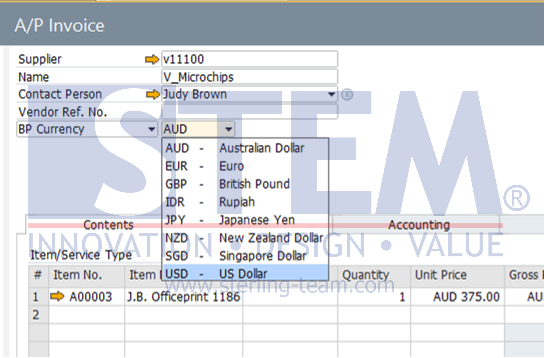
Currency setup in SAP Business One is a crucial first step in managing multi-currency transactions. With proper configuration, companies can ensure that cross-border transactions are recorded accurately, minimize errors, and maintain the consistency and integrity of financial reports.
Is Your SAP B1 Currency Setup Correct?
Currency configuration issues often go unnoticed until they affect transactions or financial reports. Our team can help ensure your SAP Business One is configured correctly for your business needs.
Also read relevant SAP Business One Tips:
- Use Multiple Currencies in SAP B1 Header & Rows
- Enable Multiple Scheduling for SAP B1 Service Calls
- Multi-Currency Financial Reports in SAP Business One
- How to Set Up User Groups in SAP Business One
- How to Deactivate a Warehouse in SAP Business One
- How to Hide Inactive Contact Persons in SAP Business One