
Users can change the description of any field by using the Changing Description feature, this feature can be used if the user has superuser status, or by authorizing “Renaming Field” on the General Authorization menu
This Changing Description feature can be used by pressing the “Ctrl + double click” button on the keyboard and mouse on the field you want to change.
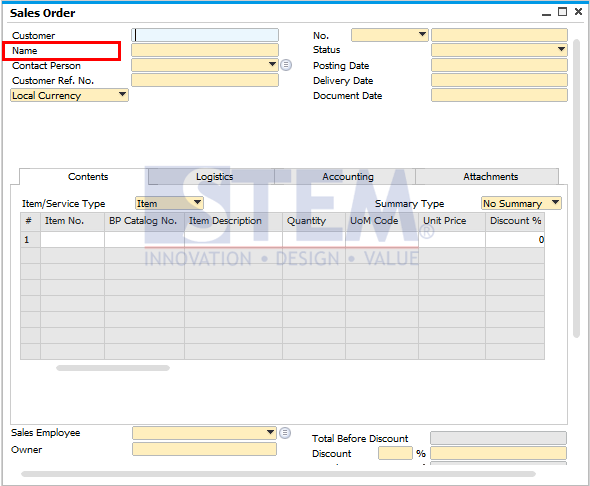
In the example image above we want to change the “Name” field, when we press the “Ctrl + double click” window the “Changing Description” window will appear
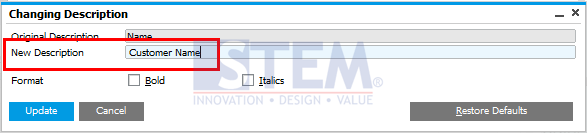
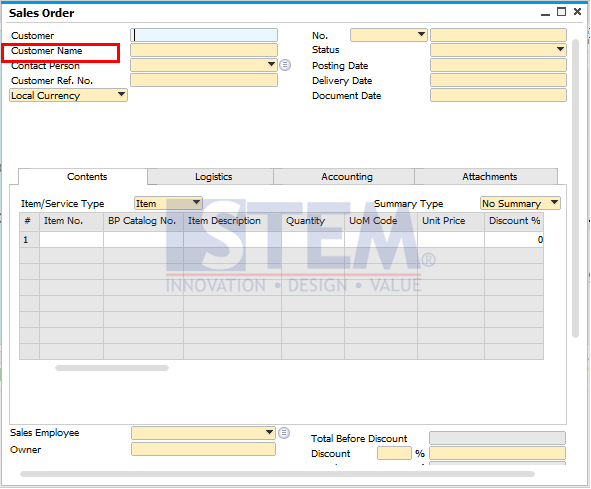
After changing the name and pressing the update button, the field will change its description according to what was entered in the “New Description” field.
Also read relevant SAP Business One Tips:
- Automate Closing Period in SAP Business One
- Form Authorization & Main Menu Settings Guide in SAP Business One
- Disable User-Defined Field in SAP Business One
- Fix “No Matching Record” Error in Approval Report
- Layout Preview Authorization in SAP Business One (Guide)
- How to Hide Locked Users in SAP Business One