
These steps will explain to you about Packing feature on SAP Business One, which can be used to track what items are in Packing in a shipment.
Here’s how to make a packing slip to be included in a packing in the shipment:
- Select the Delivery menu or A / R Invoice or A / R Invoice + Payment
- Right-click in an empty area in the document window’s screen
- Choose Packing Slip
- For how many packs or packages are sent in 1 Delivery or 1 A / R Invoice or 1 A / R Invoice + Payment
- Select the package that was created
- Assign items that are in one packing into the package
- After that click the OK button
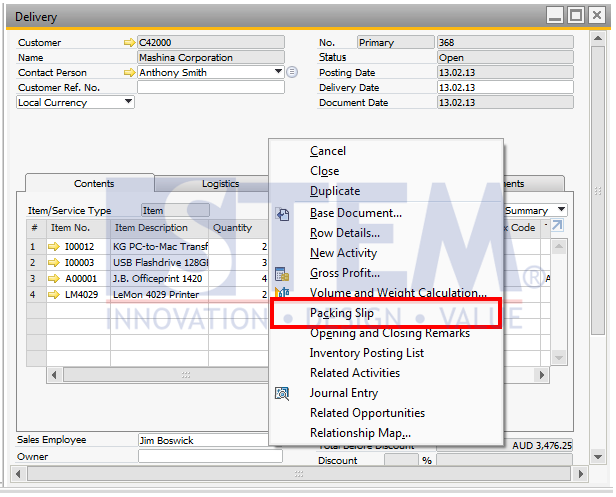
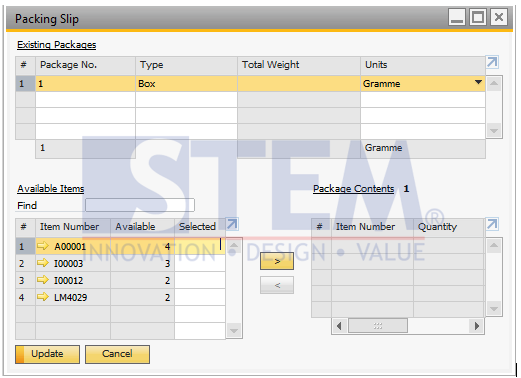
After the packing slip is made, in a shipment it can be tracked or traced, the deliveryman sends how many packages and in each package there are any items or items.
Also read relevant SAP Business One Tips:
- How to Create Issue for Production in SAP B1
- How to Generate Pick List in SAP Business One
- How to Set Default Bin Location in SAP Business One
- Re-activate Items in SAP Business One – Step-by-Step
- Recalculating Gross Profit Using the Gross Profit Recalculation Wizard
- Enhanced Variance Report for Production Orders FP 2405