Sometimes we need more information to be included in the material line item which is a component of a finished good. So that when a production order is submitted to the production department, they can read and follow the information contained in the Bill of Material.
In SAP Business One, this can be achieved by adding an identical UDF (same title, description, field type, and length) to the Bill of Material and Production Order screens. By adding an identical UDF to the two screens, the information that we enter into the Bill of Material will also be displayed on the Production Order screen.
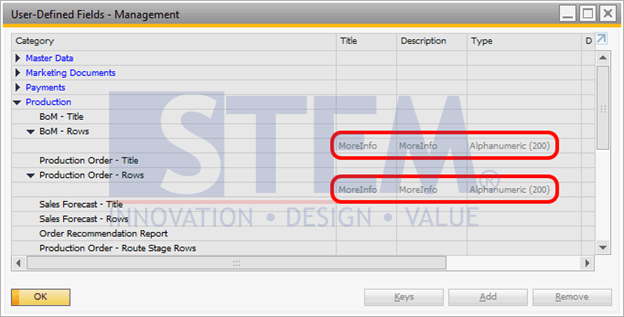
SAP Business One Tips – Additional Information on Bill of Materials Component
So that when we add information to the UDF contained in the Bill of Material window:
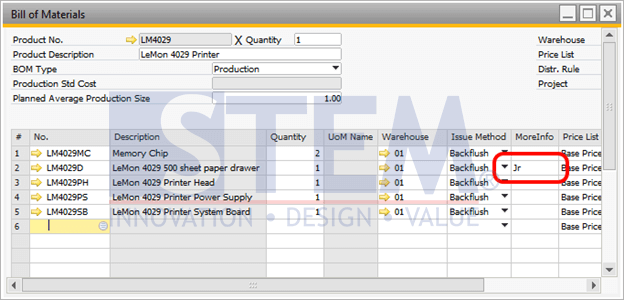
SAP Business One Tips – Additional Information on Bill of Materials Component
The same information will also appear on the Production Order screen:
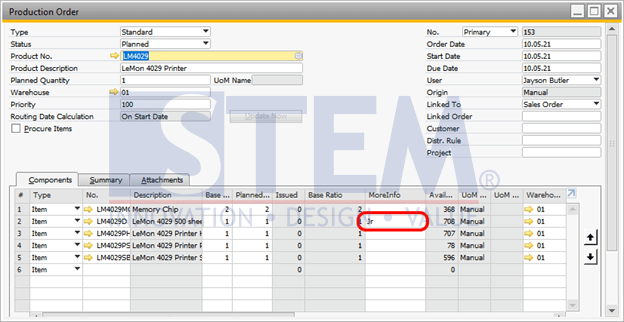
SAP Business One Tips – Additional Information on Bill of Materials Component
Available on SAP Business One 9.3 and SAP Business One 9.3 versions of SAP Hana
Also read relevant SAP Business One Tips:
- Understanding BoM Types in SAP Business One – Part 1: Sales BoM
- Production Order Planned & Released Query for SAP B1
- How to Define Item Groups in SAP Business One
- Enhanced BOM Description Update in SAP Business One v10
- Credit Memo Without Affecting Inventory in SAP B1
- Update Production Orders After Close/Cancel in SAP B1