
Business routine just like our daily routine, the business also has a routine that consists of many actions or transactions such as paying electricity, salaries, ordering materials, etc.
For this routine and regular transaction, you can use Recurring Transactions Templates in SAP Business One (for more information about how to add Recurring Transaction Template you can see the article here: Add a Recurring Transaction Template | SAP Business One Indonesia Tips | STEM SAP Gold Partner (sap-business-one-tips.com)) and can be executed according to the time or frequency that you choose.
But since SAP Business One 10.0 FP 2008 and SAP Business One 10.0 FP 2008, version for SAP HANA. SAP added two new recurrence periods to provide more flexibility for your business routine transactions. You can now set your recurrence period every two weeks or two months!
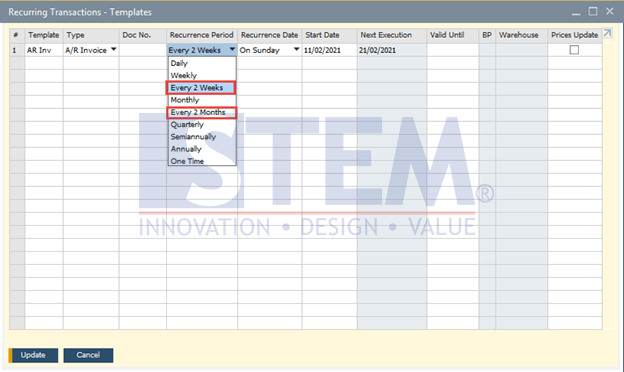
SAP Business One Tips – Recurring Transactions is More Flexible!
*Note: This feature only available in SAP Business One 10
Also read relevant SAP Business One Tips:
- Update Production Orders After Close/Cancel in SAP B1
- How to Hide Unused Layout in SAP Business One Easily
- Setup Additional Authorization Creator in SAP B1
- Export & Import Crystal Reports in SAP Business One
- How to Change Control Account in SAP Business One
- How to Deactivate Approval Template in SAP Business One