
SAP Business One are known as a flexible ERP Software because of the ability to work with multiple windows (forms, transaction, report) open at a same time. For example, you can create sales order while you are also looking at the BP Customer Master Data to display the relevant price list. You can increase efficiency and quickly get access to the relevant window where many similar ones. SAP Business One provides you “Window” menu.
When you open many windows and want to put all the windows in order, you can choose “Cascade”. Or, if you want to close all active windows you can choose “Close All”. And if you want to close all windows except the one you’re open right now you can choose “Close All But This”. To bring specific active windows forward, you can choose it from the bottom of the “Window” menu.
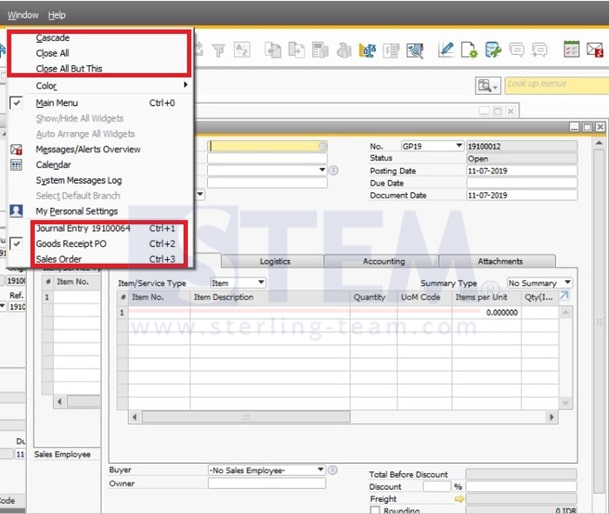
The option “Close All But This” is available from SAP Business One 9.3, version for SAP HANA and SAP Business One 9.3.
Also read relevant SAP Business One Tips:
- Record Every Activity Using a Time Sheet
- How to Show Draft No. Column in Document Drafts Report
- Use Multiple Currencies in SAP B1 Header & Rows
- Generate Pick List for Multiple Sales Orders SAP B1
- SAP B1 Equipment Card: Add Multiple Business Partners
- Create One Document from Multiple Base Documents in SAP B1