
The text displayed in SAP Business One may sometimes appear too small for some users, especially when using monitors with high screen resolutions. This can make SAP Business One less comfortable to read and may make it difficult for users to perform their daily activities.
SAP Business One provides personal display settings that allow users to adjust the appearance according to their needs, including the Font Size.
How to Adjust the Font Size
To change the text size in SAP Business One, follow these steps:
- On the SAP Business One toolbar, click My Personal Settings…

- The Users – Setup window will open.
- Go to the Display tab.
- In the Font Size field, select the font size according to your preference.
- After making the changes, click Update to save the settings.
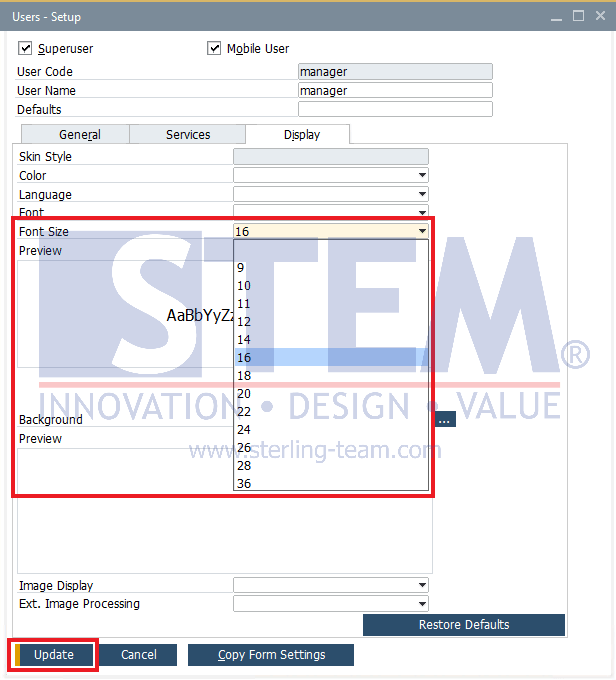
Once the settings are saved, SAP Business One will use the selected font size, making the text easier to read.
Other Display Settings
In addition to Font Size, users can also adjust other display settings in the Display tab, such as:
- Color – changes the color scheme used in SAP Business One.
- Language – changes the language used in the SAP Business One interface.
- Font – changes the font type used in the interface.
- Background – changes the background appearance.
These settings allow users to customize the SAP Business One interface to make it more comfortable to use according to their individual preferences.
Tip: If the text in SAP Business One appears too small, adjusting the Font Size is one of the first options you can try before changing Windows display settings or monitor resolution.