In SAP Business One, Contact Persons can be set as inactive instead of being deleted. This is useful when a company no longer wants to use a Contact Person but still needs to keep the information for historical purposes.
If the company does not want inactive Contact Persons to be displayed in the Business Partner Master Data, you can hide them by following these steps:
- Open SAP Business One and go to Administration > System Initialization > General Settings.
- Select the BP tab, then find the option “Display Inactive Contact Persons in Business Partner Master Data”.
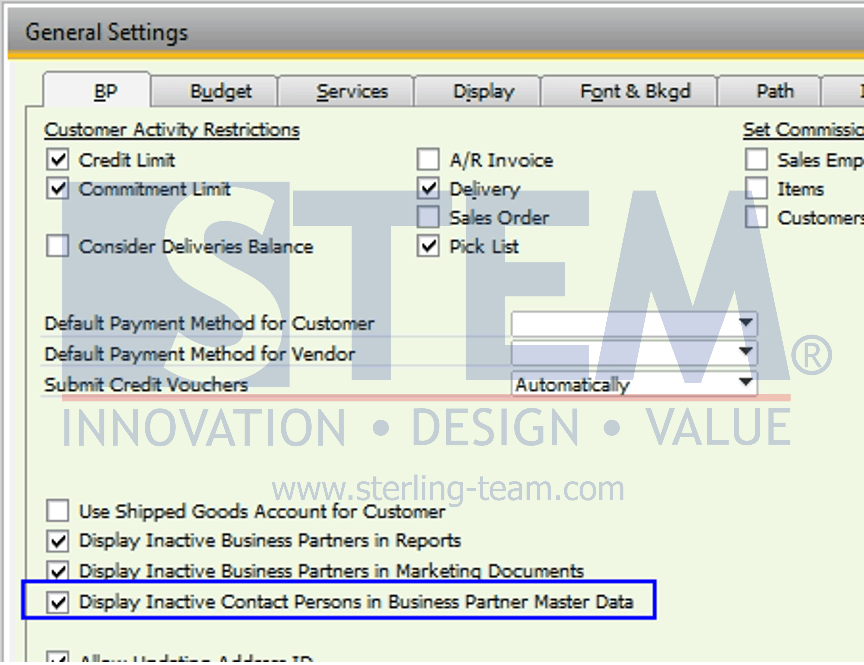
- Make sure the option “Display Inactive Contact Persons in Business Partner Master Data” is unchecked.
- Open the required Business Partner Master Data and go to the Contact Persons tab.
- For a Contact Person that should no longer be displayed but must be retained for history, uncheck the “Active” checkbox.
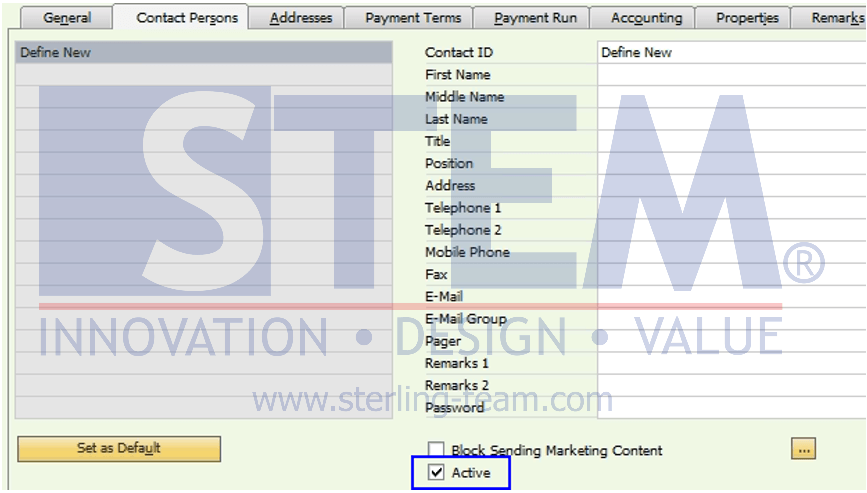
After the Contact Person is set as inactive and the General Settings option is unchecked, the inactive Contact Person will no longer be displayed in the Business Partner Master Data. The Contact Person is not deleted, so the information can still be retained for historical purposes.