In a dynamic work environment, collaboration among multiple users within a single company database is a common practice. However, there are times when the system requires updates to critical settings that are technically best performed when no other users are active (Single User Connection).
In many cases, administrators or authorized users are forced to ask all colleagues to log out just to make a minor configuration change. This can certainly disrupt productivity. To address this challenge, SAP Business One provides a flexible feature within General Settings that allows you to control how the system responds to updates when multiple users are connected.
Why Is This Setting Important?
Without proper configuration, the system will typically block changes to fundamental settings if it detects active connections from other users. With this feature, companies can define their level of priority: whether an update must be strictly controlled (Block Update) or can proceed with a warning (Warning).
Configuration Steps
You can access this setting by following the navigation path below:
- Go to Administration > System Initialization > General Settings.
- Select the Services
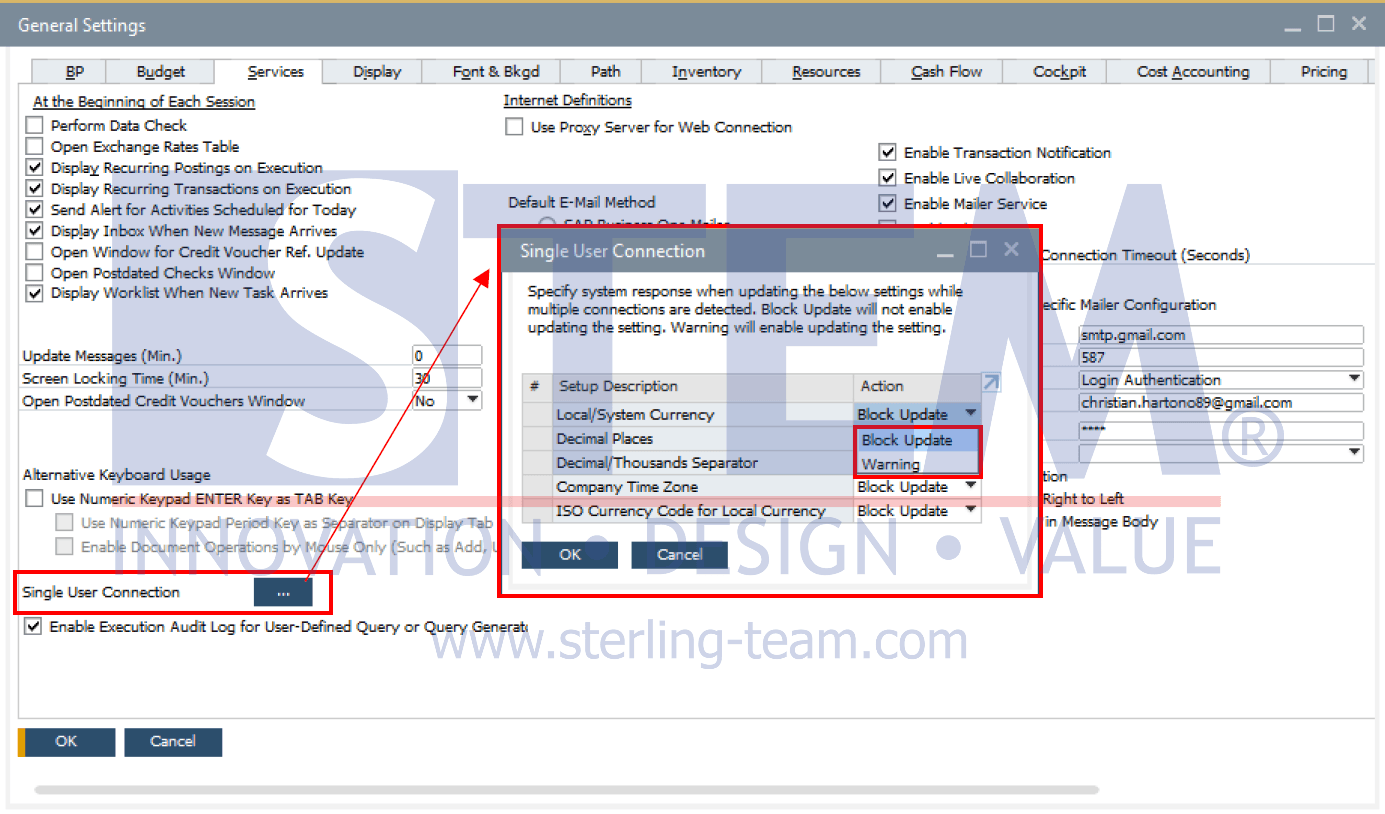
- Locate the Single User Connection option at the bottom of the window.
- Click the […] button to open the detailed configuration window.
List of Configurable Parameters
Based on the system interface, the following are some sensitive areas where you can define the behavior:
- Local/System Currency: Defines the company’s local and system currencies.
- Decimal Places: Sets the number of decimal digits for prices, quantities, and exchange rates.
- Decimal/Thousands Separator: Defines the format for decimal and thousand separators.
- Company Time Zone: Determines the time zone used for system transactions.
- ISO Currency Code for Local Currency: Standardizes the international currency code for reporting.
Each parameter provides two selectable options:
- Block Update (Blokir Pembaruan): The system strictly prevents any changes from being made as long as there are other users connected to the database. This is the safest option to avoid data inconsistencies, especially for highly sensitive parameters.
- Warning (Peringatan): This is a more flexible option. When selected, SAP will display a confirmation message when you attempt to modify the setting. The message informs you that other users are still connected, but allows you to decide whether to proceed or cancel the update.
By utilizing the Single User Connection feature, IT departments or SAP consultants can perform system maintenance more efficiently and with greater flexibility. The Warning option is highly recommended for urgent changes that do not immediately compromise data integrity, allowing business operations to continue without forcing all users to log out.
Tips: Always ensure proper internal coordination before modifying settings such as Decimal Places or Currency, as these changes directly impact all ongoing transaction documents.
Struggling to Update SAP B1 While Users Are Connected?
Single User Connection settings are often overlooked, making system updates more complicated. Our team can help you configure SAP Business One safely while minimizing business disruption.