
Starting from SAP Business One (SAP B1) 10.0 FP 2411, inventory transfers can now be performed directly across different branches within a single database.
This enhancement addresses a common operational need in multi-branch environments, where moving inventory between branches previously required additional steps.
Previous Approach
In earlier versions, transferring inventory between branches could not be done in a single transaction. Users typically needed to:
- Create a Goods Issue from the source branch
- Then create a Goods Receipt in the target branch (via Copy To / Copy From)
In some cases, companies also relied on custom add-ons to simplify this process.
As a result:
- The process required two separate documents
- There was a higher risk of inconsistencies if one step was missed
What’s New in SAP Business One (SAP B1) FP 2411
With this update, SAP Business One now allows:
| 💡 Inventory Transfer directly between warehouses assigned to different branches |
Users can simply create a standard Inventory Transfer document and define:
- From Warehouse (Source Branch)
- To Warehouse (Target Branch)
The system will handle the stock movement across branches in a single transaction.
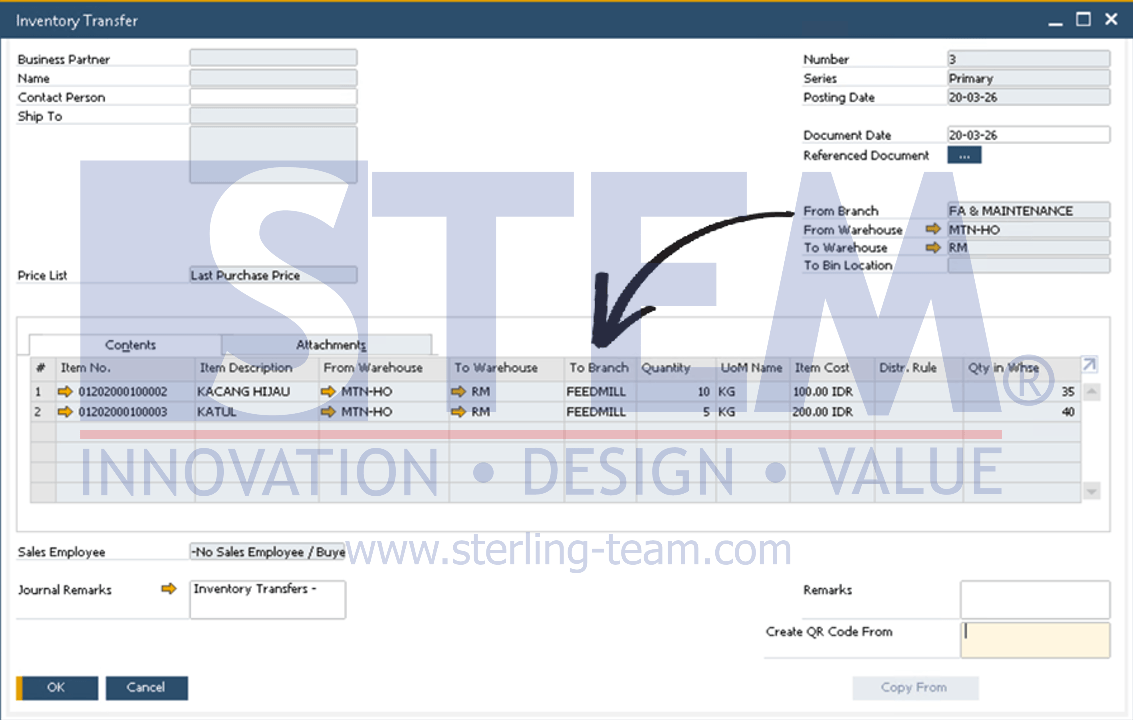
Prerequisite: Before using this feature, make sure:
- Multiple Branch functionality is enabled
- Users have the necessary authorization for cross-branch transactions
Benefits & Impact
This enhancement brings meaningful improvements to daily operations:
- Simplifies the process into a single document
- Eliminates the need for workarounds or additional add-ons
- Reduces the risk of incomplete or inconsistent transactions
- Supports more efficient operations in multi-branch environments
This enhancement may seem straightforward, but it significantly improves how inventory movements are handled across branches.
By enabling direct inventory transfers within a single transaction, SAP Business One provides a more efficient and reliable approach to managing stock in multi-branch operations.