At the company, employees certainly have their respective roles, there are parts of buying, selling, producing, and others. Each of these parts must have different needs.
In previous versions, by default, if the item is manufactured, then when you press the golden arrow, we will see the Bill of Materials.
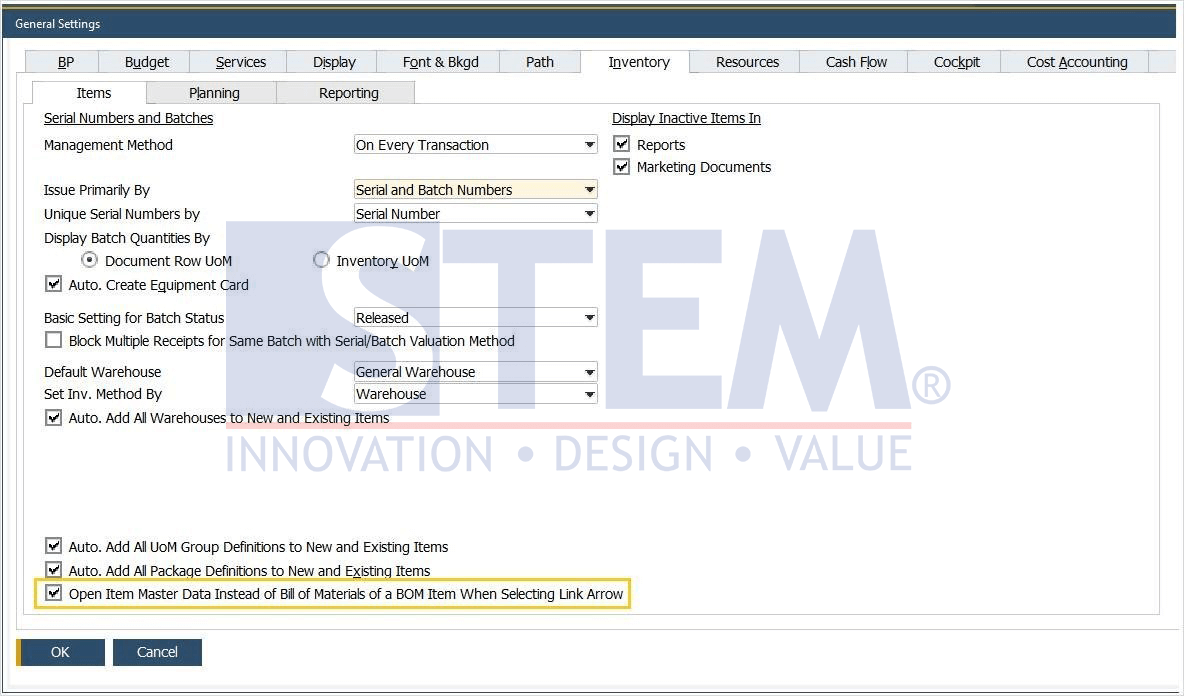
In SAP Business One 10, a new feature has been added which you can decide, if the item is a manufactured item when you press the golden arrow, you can choose to see the Bill of Material or Item Master Data of that item. You can change these settings by:
- In the SAP Business One main menu, select General Settings> Inventory tab> Items tab.
- check on the Open Item Master Data option instead of the Bill of Materials of a BOM Item when Selecting Link Arrow.
- Press the Update button.
SAP Business One Tips – Want to See Items or BOM on SAP Business One 10
That way each part of the company can make its choice, do you want to see the Bill of Materials or see the Item Master data? Make your own choices in SAP Business One 10.
Note : This feature only available in SAP Business One 10
Also read relevant SAP Business One Tips:
- Enhanced BOM Description Update in SAP Business One v10
- Understanding BoM Types in SAP Business One – Part 1: Sales BoM
- How to Define Item Groups in SAP Business One
- How to Set User Authorization to View Discount Price in SAP B1
- How to Depreciate Assets in SAP Business One – Quick Guide
- How to Set Default Warehouse in SAP B1 (Part 2)