Do you know? In SAP Business One 10 there is a new feature in the License Administration section. Now there is a Username column where there was only a User Code in the SAP Business One 9.3
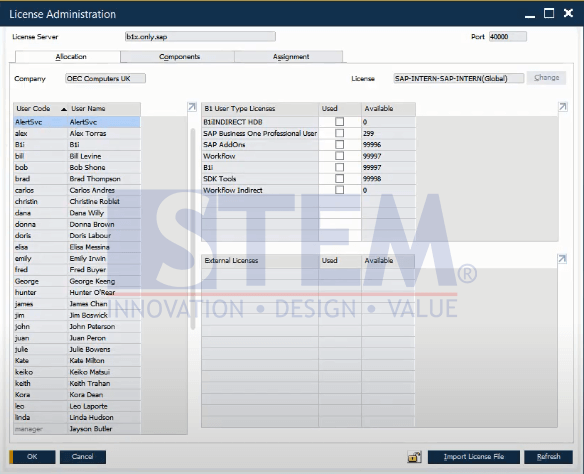
SAP Business One Tips – Username Column in License Administration
This function is given because many users have a User Code that does not match the name or only based on their division.
For example, Finance1, Finance2, IT1, IT2, etc.
This certainly complicates the task of staff in managing other user licenses due to a lack of transparency of user data. So, this Username column can help staff in managing their users’ licenses correctly.
Also read relevant SAP Business One Tips:
- New Editable GL Account Column in Purchase Request Report
- How to Create User Defined Object (UDO) in SAP B1
- How to Hide Locked Users in SAP Business One
- Referenced Documents on Relationship Map in SAP B1
- Disable “Display Inbox When New Message Arrives”
- How to Split & Merge Distribution Rule in SAP Business One