
When You create the Journal Entry with two or more accounts that are relevant to Cash Flow in Primary Form Item, and you add this document, an error message “Cash flow assignment is mandatory” appears and the selected Primary Form Item is missing.

SAP Business One Tips – Error Journal Entry with 2 or More Cash Flow Accounts
To enable the system to allow two or more Cash Flow Relevant accounts in one Journal Entry document, follow these steps:
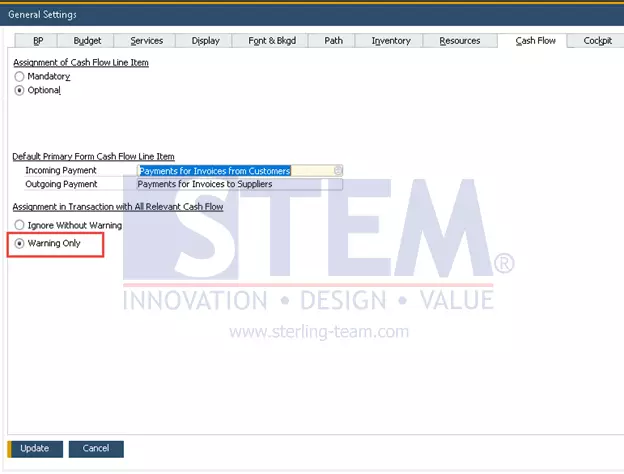
- In SAP Business One Main Menu, Select the Administration menu → System Initialization → General Settings → Cash Flow Tab.
- Under Assignment in Transaction with All Relevant Cash Flow, select Warning Only.
- Click Update.
SAP Business One Tips – Error Journal Entry with 2 or More Cash Flow Accounts
- Create the Journal Entry with two or more accounts that are relevant to Cash Flow in Primary Form Item.
- Click Add.
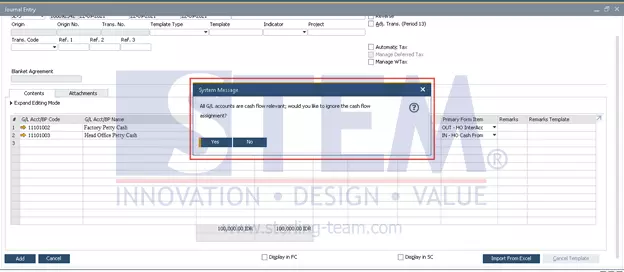
- With this new setting, you will be presented with a system message when adding the Journal Entry.
- Choose “No” to save the selected Primary Form Item and the Journal Entry document.
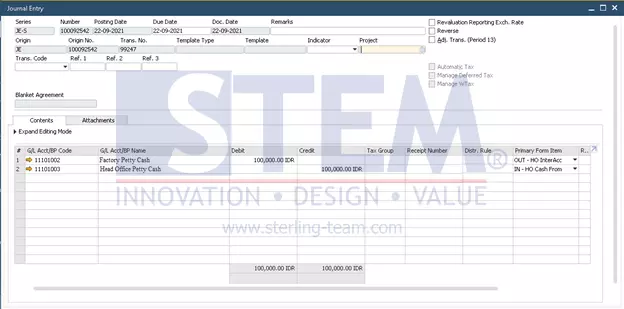
- Now, you can add the Journal Entry Document two or more accounts that are relevant to Cash Flow in Primary Form Item.
SAP Business One Tips – Error Journal Entry with 2 or More Cash Flow Accounts


Also read relevant SAP Business One Tips:
- Fix “G/L Account Needs DR Assignment” Error in SAP B1
- Fix Invalid Currency Error in SAP Business One Journal Entry
- Fix Recurring Posting Failed to Create Journal Entry
- How to Fix Error Updating Document Numbering in SAP B1
- Category in Withholding Tax Setup SAP Business One
- How to Print SAP Business One Documents Automatically