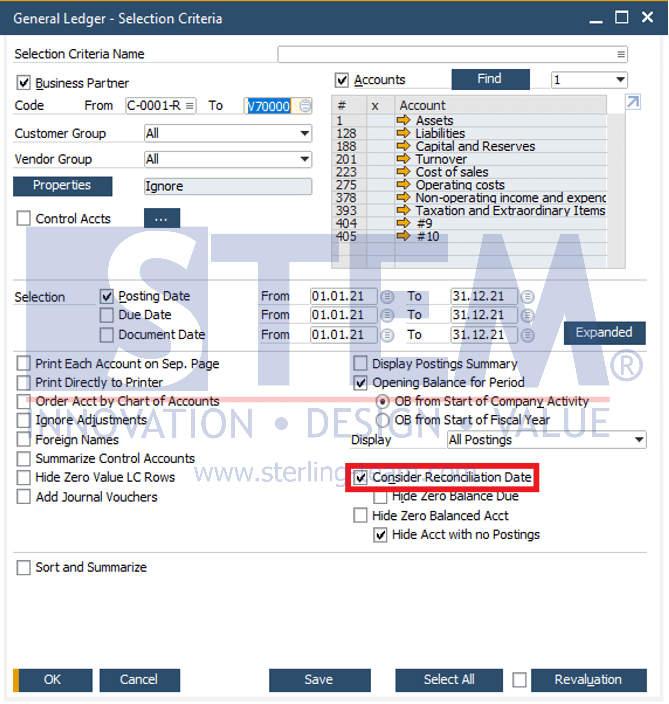
In the General Ledger report of SAP Business One, the displayed balances are calculated based on the date type selected in the Selection Criteria and the specified reporting date range. By default, the system uses the Posting Date as the reference. In this condition, SAP Business One does not consider whether transactions have been reconciled or not. For specific analytical purposes, SAP B1 provides the “Consider Reconciliation Date” checkbox.
Function of the Consider Reconciliation Date Checkbox
This checkbox is used to determine the transaction status based on the reconciliation date, not solely based on the posting date. When this option is selected:
- If the Reconciliation Date is later than the report To Date, the transaction is considered not yet reconciled and remains displayed as an open balance.
- If the Reconciliation Date is earlier than or equal to the report To Date, the transaction is considered reconciled.
As a result, the General Ledger balance will more accurately reflect the open vs. closed status from the perspective of transaction settlement.
When Should This Checkbox Be Selected?
Use Consider Reconciliation Date when:
- Analyzing AR/AP balances to identify transactions that are truly outstanding
- Investigating differences between General Ledger and AR/AP reports
- Performing internal reviews before payment or settlement follow-ups
- Supporting management discussions regarding transaction settlement status
Steps to display the General Ledger Report Using Consider Reconciliation Date.
- From the SAP Business One main menu, go to Financials > Financial Reports > Accounting > General Ledger
- On the General Ledger – Selection Criteria screen, check “Consider Reconciliation Date”