For some documents, SAP will automatically create a journal entry with some information referred to the documents.
You can setup the Journal Entry reference & remarks information with the information you need from the documents.
To setup this, go to “Administration” – “Setup” – “General” – “Reference Field Links”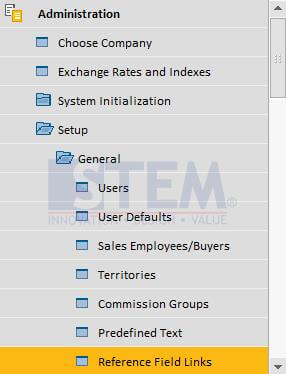
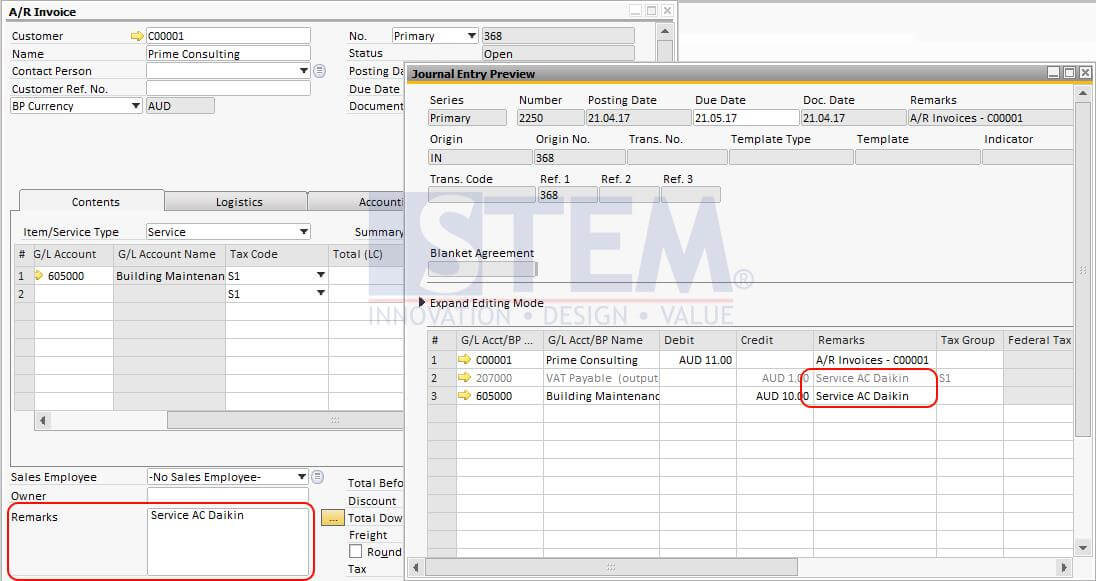
For this example, we want to setup journal entry created from A/R Invoice. We want the journal entry line remarks to have same information as A/R Invoice Remarks.
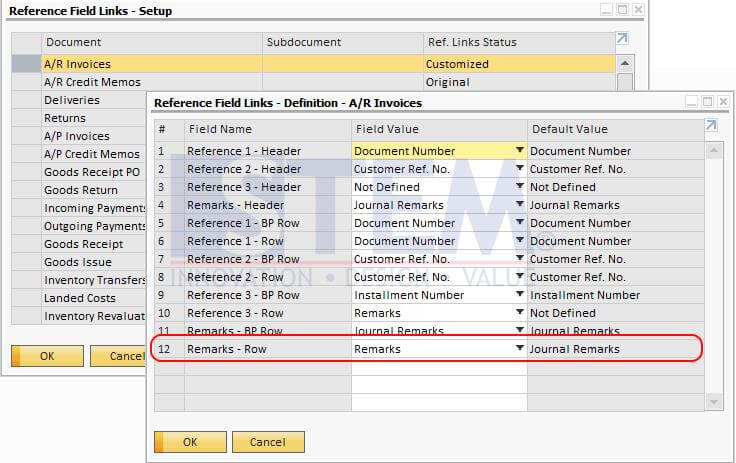
So when we create the A/R Invoice, the journal will show the information like this.
Is Your Journal Entry Information Hard to Track?
Incorrect Reference and Remarks settings can make transaction tracking and audits more difficult. Our team can help optimize your SAP Business One configuration to fit your business needs.
Also read relevant SAP Business One Tips:
- SAP B1 Journal Entry Cash Flow Error Fix
- How to Cancel Manual Reconciliation in SAP Business One
- Quick Way to View Base & Target Docs in SAP B1
- Fix “G/L Account Needs DR Assignment” Error in SAP B1
- Fix Recurring Posting Failed to Create Journal Entry
- How to Split & Merge Distribution Rule in SAP Business One