Do you want to add an Add-On to SAP Business One, but you are not sure who is accessing the SAP Business One?
Now you can easily see who is accessing the system and contact them before you enter Add-On data or disconnect them when they no longer use the system but forget to log off.
To see who is accessing SAP Business One, follow these steps:
- In the SAP Business One main menu, select the Administration menu > Utilities > Connected Clients
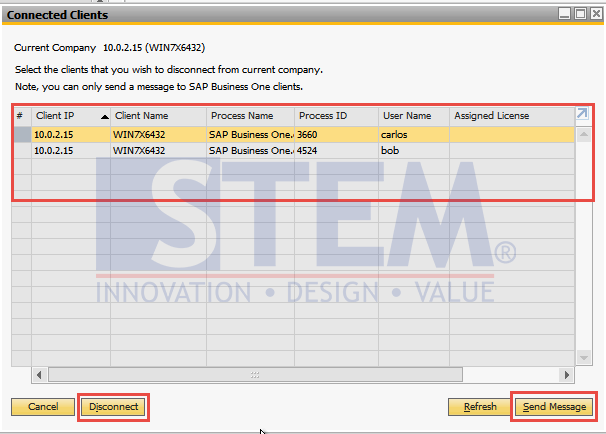
SAP Business One Tips – How To Find Out The User Who Is Access SAP Business One
- Click on the row to select the user that you want to stop the access to SAP Business One
- Press the Send Message button if you want to send the information so that users who are using SAP Business One can save or finish what they are working on and exit the system temporarily.
- Press the Disconnect button if you want to immediately stop the user from accessing SAP Business One.
This feature available in SAP Business One using SAP Hana database and using Microsoft SQL Database.
Note: This function requires the Administrator user.