Have you ever wanted to delete/remove document drafts that were accidentally created in SAP Business One? You can do this through the Document Draft Report menu, simply right-click on the document and select Remove. The complete steps can be found in the article Deleting Document Drafts.
However, have you ever encountered an error when trying to update and delete a document draft as shown below?
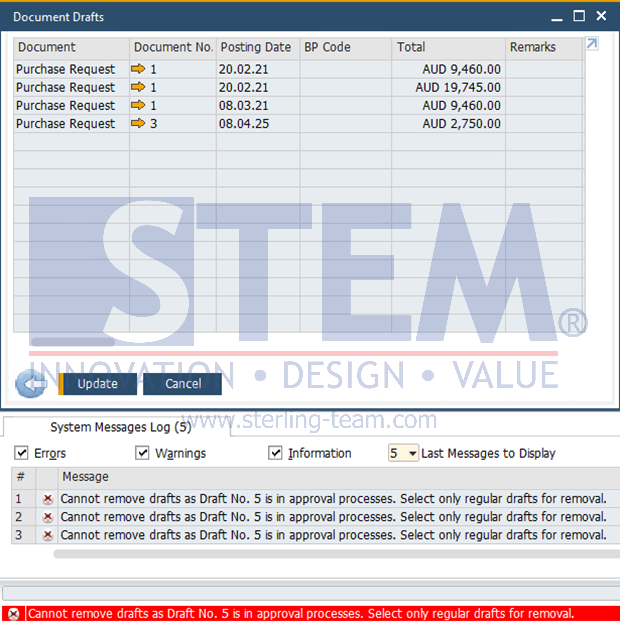
This error occurs because the document draft you are trying to delete is part of an approval process. This is the standard behavior of SAP B1: drafts that have already been submitted or are currently in the workflow approval process cannot be deleted directly.
To check the status of the document, you can go to: Administration > Approval Process > Approval Status Report.
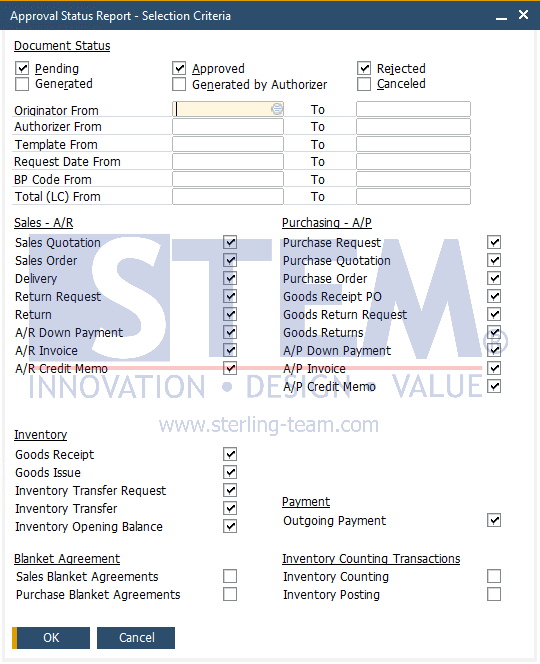
In order to delete the draft, the document must first be rejected from the approval process. Once its status changes to Rejected, you can return to the Document Draft Report and perform Remove on the draft.
Also read relevant SAP Business One Tips:
- Faster Approval in SAP B1 with Right-Click Feature
- Create & Update Parameters in SAP Crystal Reports
- Utilizing Approval Decision Report in Approval Process
- Limit Document Cancellation by Age in SAP Business One
- How to Show Draft No. Column in Document Drafts Report
- Fix “No Matching Record” Error in Approval Report