June 7, 2017
If we are talking about an item master data, it would not be complete if it does not include an image of the item. With images, it will make it easier for departments to do transactions. For example, an image…
Inventory & Production
SAP Business One: 600+ Free Tips to Become SAP B1 a Super User from Sterling Tulus Cemerlang (STEM)
June 7, 2017
If we are talking about an item master data, it would not be complete if it does not include an image of the item. With images, it will make it easier for departments to do transactions. For example, an image…
May 18, 2017
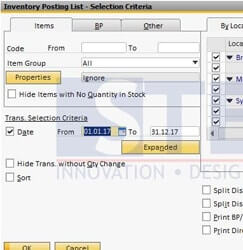
SAP Business One provide some reports to help you analyze. One of the most used is “Inventory Posting List”. Using this report, you can analyze the inventory transaction base on items, business partner, or others. These are samples from Inventory…
May 15, 2017
When you do business with your customers, some of them don’t allow you to do partial delivery. There are 2 options to prevent this kind of errors when delivering goods to the customer. One of them is by using the feature…
April 18, 2017
An item in SAP Business One, can be set as a phantom item. What is it ? Phantom item is like an alias for some items. It usually used in multilevel Bill of Material (BoM). Instead having to write down…
April 16, 2017
Usually, it takes more than 1 (one) person / team to do inventory counting. SAP Business One also has this ability to help you doing inventory counting, so you can do inventory counting with more than 1 counters / team…
March 30, 2017
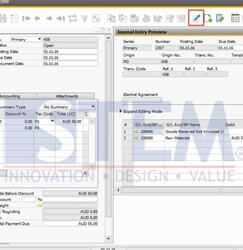
First time using a SAP Business one and totally afraid make an error when inputting transaction? Just use Icon Journal Entry preview (see red box screenshot below) before you add the transaction to avoid a mistake such as wrong Account,…
March 20, 2017
In SAP Business One, There are 3 Item Group Inventory Valuation Methods. They are : Moving Average – the method is based on the calculation of an average cost for the item in each sales and purchasing transaction. Standard…
February 27, 2017
Now, in SAP Business One, you can maintain the document status of production order in menu ‘Open Item List’, You can select multiple Production Order and change the status of document with one click button (This is applicable in SAP…
February 15, 2017
In SAP Business One, you can allow or block negative number (below zero) of your inventory. You can setting it on Administration – System Initialization – Document Setting – Block Negative Inventory (check the box if you want to block).…
September 19, 2016
In SAP Business One, we can create procurement document (Purchase Request, Purchase Quotation, Purchase Order or Production order), based on sales document (sales quotation or sales order) For Example: Because of system behaviour then in every sales order or quotation…
August 25, 2016
Now with SAP Business One, we can maintain resource. So start from now SAP Business One can help you to maintain Resources Capacity and also calculating your Cost of item production more detail and exact. If you choose the type…
August 12, 2016
Did you know that in SAP Business One have Material Requirement Planning (MRP) that can help you to monitor stock to reduce risk of out of stock and overstock in your warehouse. By simply setting in your item master data,…
July 18, 2016
Another helpful feature from SAP Business One is “Relationship Map”. This feature allows you to see what other document related to your document, or how far your document has been processed. To use this feature, right click on an open…
copyright © 2016 Sterling Tulus Cemerlang - SAP Indonesia Gold Partner . all rights reserved