In SAP, there are cancel document and close document features, and some companies sometimes don’t allow some users to be able to cancel and close documents.
To accommodate this, in SAP there is an authorization that does not provide access to the user to cancel and close documents, which are as follows:
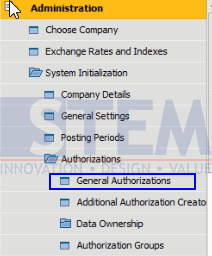
- Go to menu Administration > System Initialization > Authorizations > General Authorizations
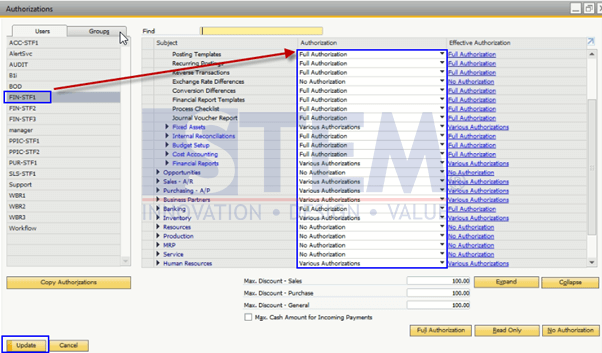
- Then the screen below will appear. Choose the user who can not cancel or close the document
SAP Business One Tips – Cancel and Close Documents Authorization
- Drop-Down the general menu, there are subjects:
- Cancel Marketing Documents by Generating Cancelation Documents
- Cancel Other Documents
- Close Document
- Give authorization “No Authorization” if the user is not allowed to cancel or close the document.

SAP Business One Tips – Cancel and Close Documents Authorization
- Press the Update button.
Users who do not get authorization will not have access to Cancel and Close Documents.
Also read relevant SAP Business One Tips:
- Layout Preview Authorization in SAP Business One (Guide)
- How to Set Authorization for Duplicating Documents in SAP Business One
- Authorization for Custom Crystal Reports in SAP B1
- Block Duplicate Cust. Reference No. in SAP B1
- How to Copy Attachment Documents in SAP Business One
- How to Give User Query Permissions in SAP Business One