





Do you ever wonder why you need to see the functions if you aren’t using it?
SAP Business One start from version 9.1 becomes more flexible fit the business. In company level, you can disable or hide unused functions or feature.
The settings in Menu : Administration > System Initialization > General Settings.
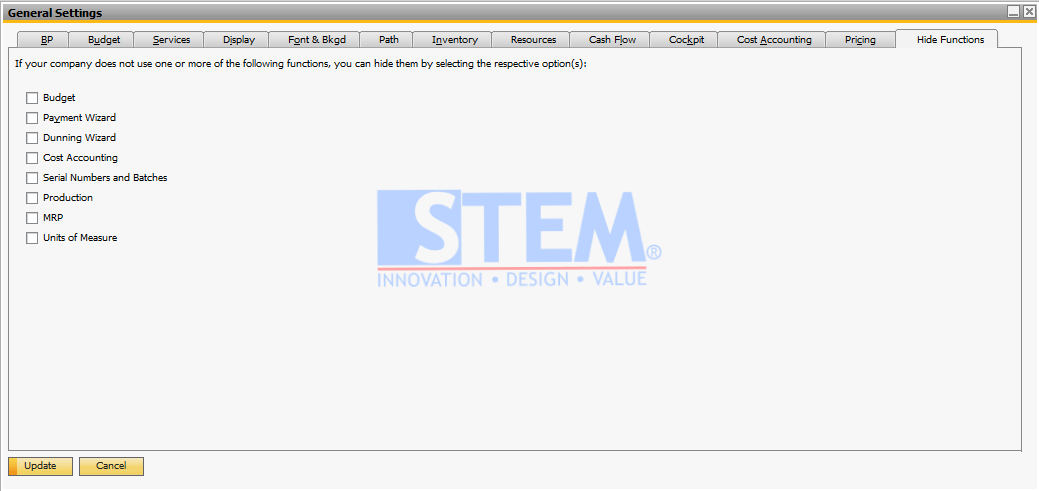
Just checklist on unused menu to hide the menu(s) and then click Update
If one day, you need the feature or functions just clear the checklist and update it again.
NOTES: this disable or hide function Available start in SAP Business One 9.1, version for SAP HANA and SAP Business One 9.1 version for SQL Server
Copyright © PT Sterling Tulus Cemerlang – 2016
Also read relevant SAP Business One Tips:
- SAP Business One Microsoft 365 Setup & Integration Guide
- How to Hide Unused Layout in SAP Business One Easily
- Maximize Your Entire Window Area for Better Productivity
- Set Default Currency & Hide All Currencies in SAP B1
- View Items or BOM in SAP Business One 10 Easily
- Enterprise Search Data in Fiori‑Style – SAP B1









