First time using a SAP Business one and totally afraid make an error when inputting transaction?
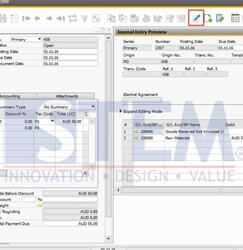
Just use Icon Journal Entry preview (see red box screenshot below) before you add the transaction to avoid a mistake such as wrong Account, Posting Date, Distribution Rules, Value, etc. You can simulate your transaction to see if the journal entry is already right.

Also read relevant SAP Business One Tips:
- Fix “G/L Account Needs DR Assignment” Error in SAP B1
- Credit Memo Without Affecting Inventory in SAP B1
- AI Insight for SAP Business One to Read Reports Smarter
- SAP B1 Journal Entry Cash Flow Error Fix
- How to Add Notes to Journal Entry in SAP Business One
- Change CPL Display by Toggling Display Description SAP B1