





For simple choose from list we don’t need create from add-on. We can create it with formatted search and user defined value. For example we want create choose from list from Business Partners where BP type = Customer.
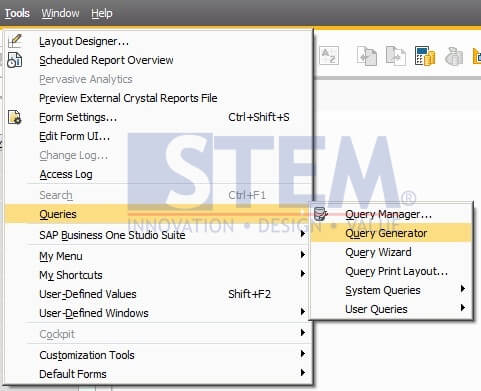
First, we create query from Query Generator. After the screen Query Generator is open, click the button “Execute”, so we can create query manually.
Screen Query Preview will be opened, and then we click icon of Pencil for edit the query. And then type the query like the picture below.

We can look the result after click “Execute” button. After that click “Save”. Type Query Name and click “Save”.
After that in the click on the field where we want to create choose from list. And then use key Alt + Shift + F2 to open User Defined Value screen. And then Tick Search in Existing User-Defined Values according to Saved Query. And then click “Open Saved Query” and choose which query you want to use. And then click “Update”.

After that in the field that we want to create choose from list will appear magnifying glass icon, like this . And then click the magnifying glass icon and the choose from list will appear.

And then click the value and click “Choose” or double click on that value.

And the BP Code automatically insert in that field.
Copyright © PT Sterling Tulus Cemerlang – 2017
Also read relevant SAP Business One Tips:
- SAP B1 Transaction Notification Validation Tips
- Set Search Result View in Choose From List SAP B1
- How to Create User Defined Object (UDO) in SAP B1
- Add Search Criteria in SAP B1 Form Settings
- SAP Business One Form Types Explained with Practical Examples
- Allow UDF Editing in SAP B1 Document Rows (v10 Feature)





