If you adding document numbering to a series of documents, then an error message appears “Numeric value deviates from legal range”, as shown below :
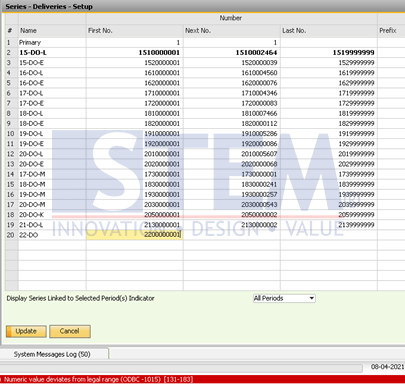
SAP Business One Tips – Error Update Document Numbering
then the cause of the error message is because the data type for the numbering document is an integer, and the maximum integer value is 2147483647, so if the numbering input exceeds that value, the above error message will appear.
For the solution, enter the numbering (first and last) smaller than 2147483647, and to anticipate the error message, specify the numbering document format consist of only 9 digits number.
Also read relevant SAP Business One Tips:
- SAP B1 Journal Entry Cash Flow Error Fix
- Fix Invalid Currency Error in SAP Business One Journal Entry
- How to Fix SAP Business One Add-On Installation Failed
- Fix Date Deviates Error in SAP Business One
- Fix “G/L Account Needs DR Assignment” Error in SAP B1
- Cannot Edit Item Code Because It’s a Component? Fix Here