Account Control is generally used to map Business Partners to the Chart of Accounts. Account Control on SAP Business One has several advantages:
- We can create Account Controls on the Chart of Accounts as well as Business Partners in different Masters.
- No need to make a Credit / Debit on General Ledger.
Here are the steps to activate Account Control on the Chart of Accounts:
- On the SAP Business One Main Menu, select Financial Menu> Chart of Account.
- Make sure the Chart of Account window is in Find
 mode.
mode. - Determine the account that will be used as Control Account.
- Then check the Control Account section.
- Press the Update button.
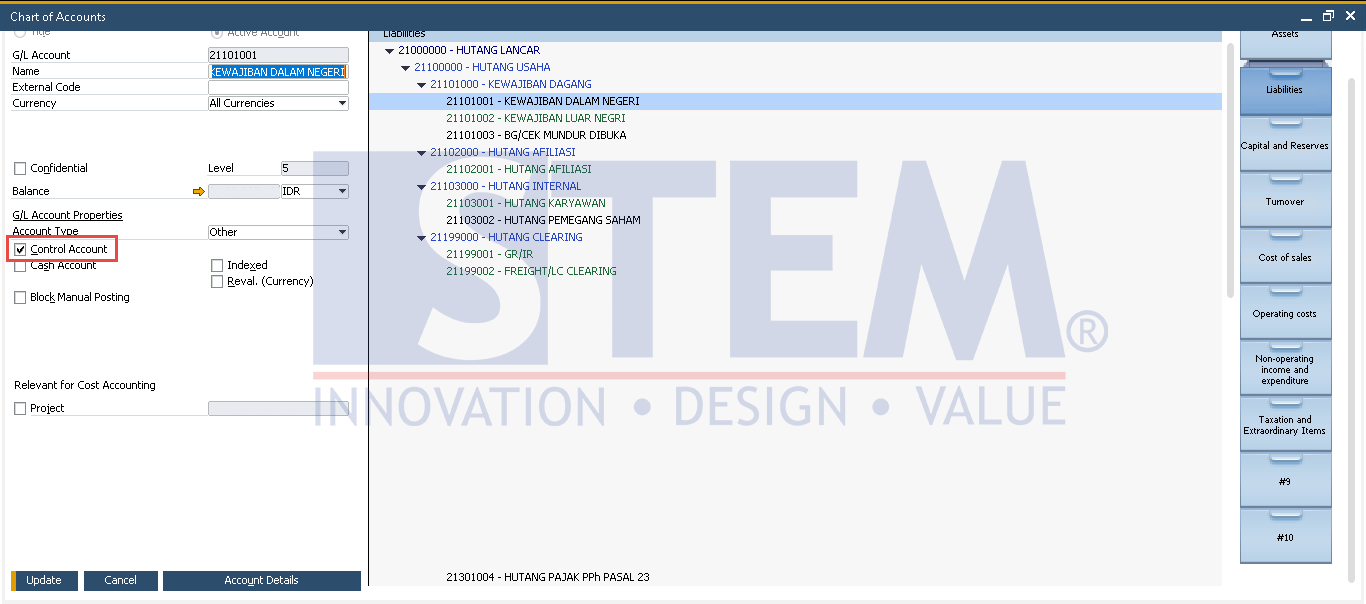
How to Defined Control Account in SAP Business One
- The account can be used as a Control Account.
Also read relevant SAP Business One Tips:
- How to Split & Merge Distribution Rule in SAP Business One
- How to Add Tax Group in SAP Business One Easily
- SAP Business One Chart of Accounts Account Types
- How to Change Control Account in SAP Business One
- Profit & Loss Template Without Inactive Drawers
- How to Delete Chart of Accounts in SAP Business One