
When a company implements SAP, SAP Business One will provide options to define the Chart of Account, namely:
- Pre-defined Chart of Account Templates
- Import Chart of accounts from the old system
- Define a new Chart of Account
If companies choose the Pre-defined Chart of Account Templates, they certainly don’t have to bother creating new data or matching old data to the latest system. However, when using the Pre-defined Chart of Account Templates it means that we match our data with existing templates on a system that has already been created which may contain more data from the template and we don’t use it. To remove the unused CoA the way to do is:
- In the SAP Business One main menu, select Administration menu > Setup > Financial > Edit Chart of Account.
- In the Edit Chart of Accounts – Selection Criteria window select the CoA criteria you want to delete.
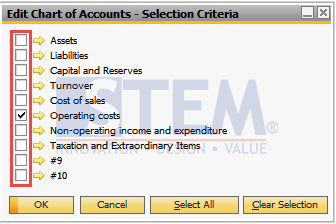
SAP Business One Tips – How To Delete Chart of Accounts on SAP Business One
- Press OK.
- The Edit Chart of Account window will appear.
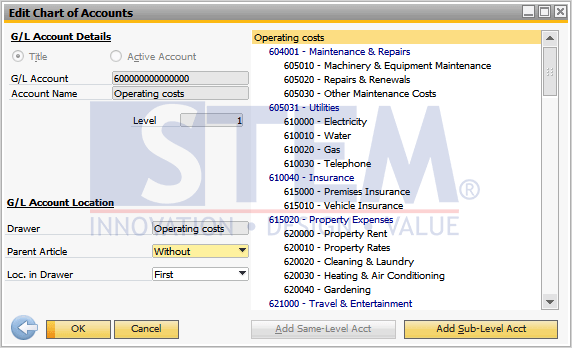
SAP Business One Tips – How To Delete Chart of Accounts on SAP Business One
- Choose which CoA you want to delete from the G / L Account by right-clicking > Advanced > Delete Account.
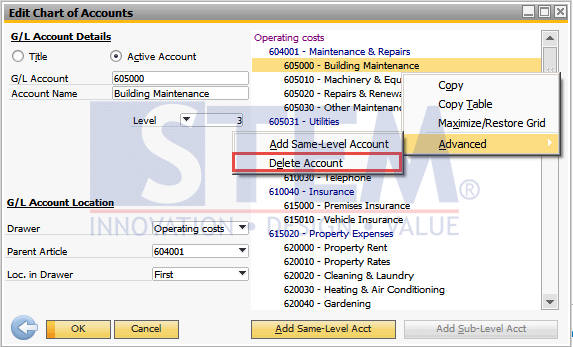
SAP Business One Tips – How To Delete Chart of Accounts on SAP Business One
- Then click Update.
Note: Accounts that have been used in a transaction cannot be deleted.
Can’t Delete a Chart of Accounts?
Some G/L accounts cannot be deleted even though they appear to be unused. Our team can help identify the root cause and provide the right solution for your SAP Business One environment.
Also read relevant SAP Business One Tips:
- How to Add Tax Group in SAP Business One Easily
- Enable Advanced G/L Account Determination in SAP B1
- How to Remove Restrictions When Setting Revenue Account
- How to Print SAP Business One Documents Automatically
- How to Set SAP Business One Control Account – Guide
- Set Cash Limit per User on Incoming Payments in SAP B1