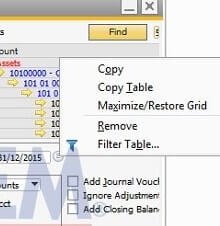
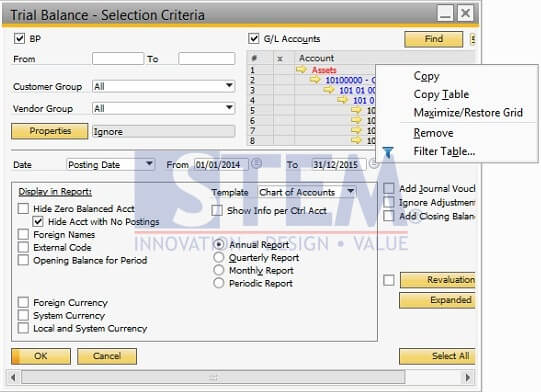
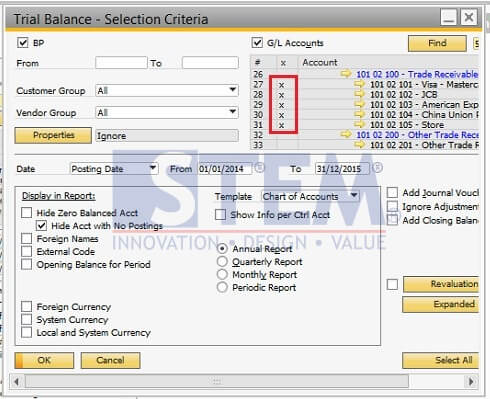
You can maximize screen to choose multiple GL account with tick mark in SAP Report Trial Balance and General Ledger, or another SAP Business One Financial Report that have tick mark GL Account matrix.
It is quite helpful because you can view and choose GL account with large screen.
Below is step to maximize restore Grid:
- Right Click on account area
-
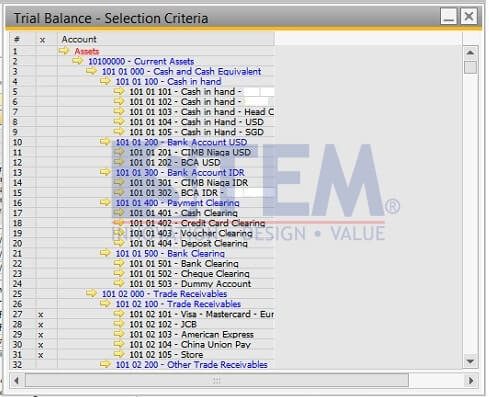
- Choose Maximize/Restore Grid and after Selection Area appear, you can tick GL account that you want
- After finish tick mark GL Account, right click and Account area then choose Maximize/Restore Grid to back on Report Screen
- Your selected Account will be appear with tick mark on Report Selection criteria screen
Also read relevant SAP Business One Tips:
- Hide Account Titles in SAP B1 Financial Reports
- How to Depreciate Assets in SAP Business One – Quick Guide
- Use Multiple Currencies in SAP B1 Header & Rows
- Consider Reconciliation Date in SAP B1 General Ledger
- Fixing Permission Error in SAP B1 Customer Aging Report
- What Is Balance Due Field in SAP Business One Invoice?