
Do you know that in SAP Business One you can convert manual master data codes (if you have any from the legacy system) to automatic numbering series?
In this way, you can easily convert the range of manual master data codes (Item/BP) into a defined numbering series.
Follow the steps below:
- In SAP Business One main menu, select the Administration menu> Utilities > Manual Master Data Series Converter
- The Manual Master Data Series Converter – Selection Criteria window will appear
- Define the range of the manual master data codes and choose the target numbering series.
- Click OK.
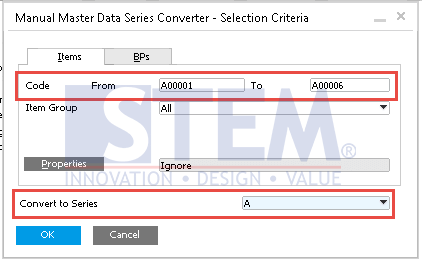
SAP Business One Tips – Convert Manual Master Data Codes to Automatic Numbering Series
- The Manual Master Data Series Converter will appear, showing you all the codes that are in defined range and indicates if there is an error that could block the conversion.
- Check the code that you want to convert
- Click Convert.
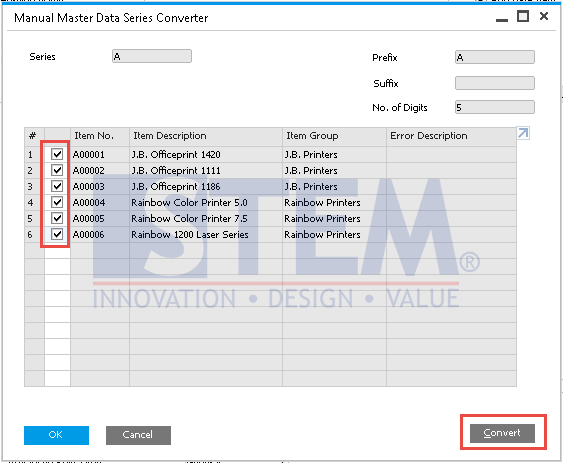
SAP Business One Tips – Convert Manual Master Data Codes to Automatic Numbering Series
- After that, the selected codes will convert.
For example:
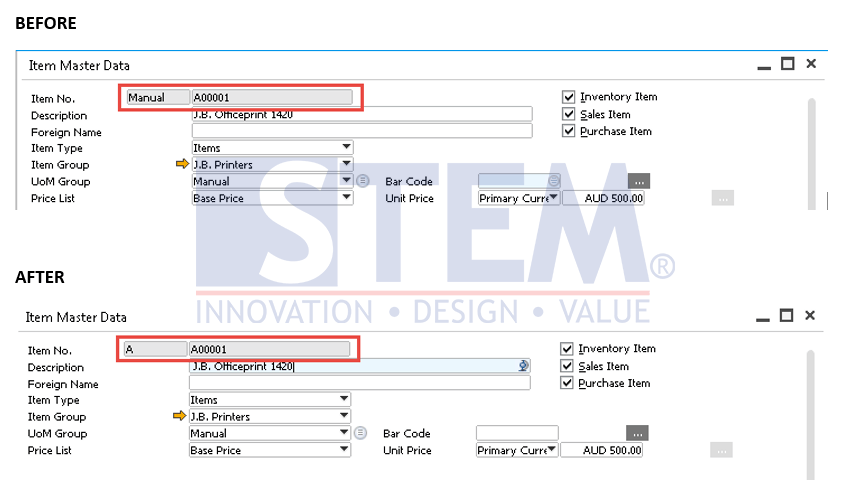
SAP Business One Tips – Convert Manual Master Data Codes to Automatic Numbering Series
Also read relevant SAP Business One Tips:
- Auto Suggestions for User Input in SAP B1
- How to Fix Error Updating Document Numbering in SAP B1
- How to Check Item Stock Availability in SAP Business One
- How to Depreciate Assets in SAP Business One – Quick Guide
- Duplicate SAP Business One Item Master Data Quickly
- HANA Schema Backup Script: One-Step Automation