
Did you know that Customer Equipment Card can be set to switch automatically to a new business partner when it sales?
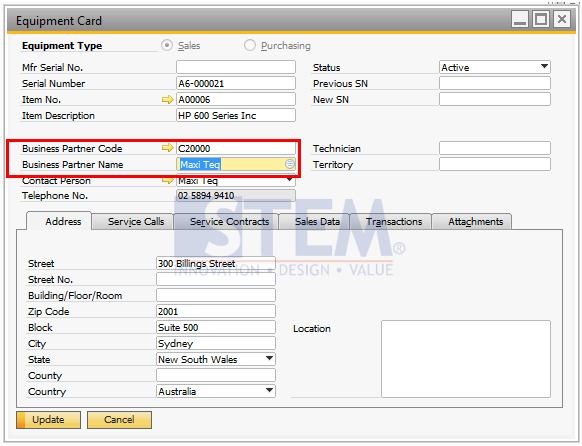
In SAP Business One, if an item has been sold to another customer, then the serial number will be owned by the previous equipment card, here’s how to change the business partner’s name on the Equipment Card:
- Select Service -> Equipment Card Menu:
- Look for the Item Number or Serial Number of the Item the Business Partner wants to replace
- After the item is found, just change the Business Partner Name or Business Partner Code
- Then just click Update
Note:
Business Partners on Equipment Card can be replaced if there is no outstanding Service Call on the item with the serial number.