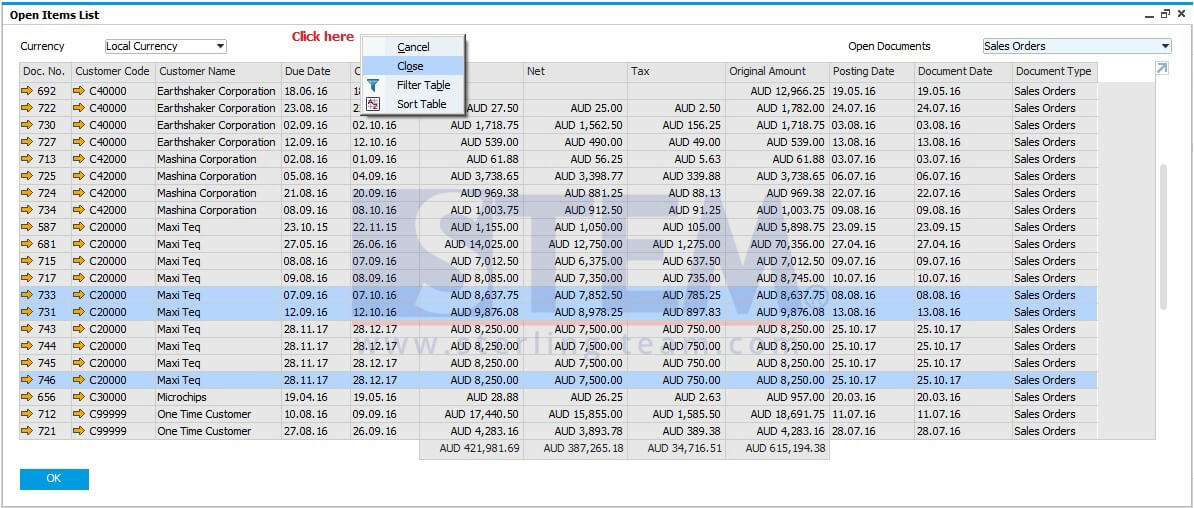
Open Item List Reports as one of the most viewed reports in SAP Business One, comes with a lot of enhancement on SAP version 9.2 patch level 05. Now, you can easily cancel or close multiple documents at once by displaying the open documents of the required type, for example Sales Orders or Purchase Orders, select one of the relevant documents, until highlighted and from the context menu choose “Cancel” or “Close”.
But this feature won’t compatible for every document on SAP B1.
NOTE: Only available on SAP version 9.2 Patch Level 05 and above
Also read relevant SAP Business One Tips:
- How to Show Draft No. Column in Document Drafts Report
- Optimize Marketing Docs with SAP Row Details Feature
- How to Add an Open Sales Orders Shortcut in SAP B1 Web Client
- Set Search Result View in Choose From List SAP B1
- Close vs Cancel in SAP Business One Documents
- Limit Document Cancellation by Age in SAP Business One