If you want to add new warehouse, please make sure that your new warehouse is auto added to all of your existing items on your database company.
Sometimes, it’ll takes a long time when you have a lot of master data item, and you need to create new warehouse, this tip will be very useful and will save a lot of your time. This is so important to make sure this option was ticked, before adding a new warehouse on SAP.
On Administration – System Initialization – General Setting, tab Inventory
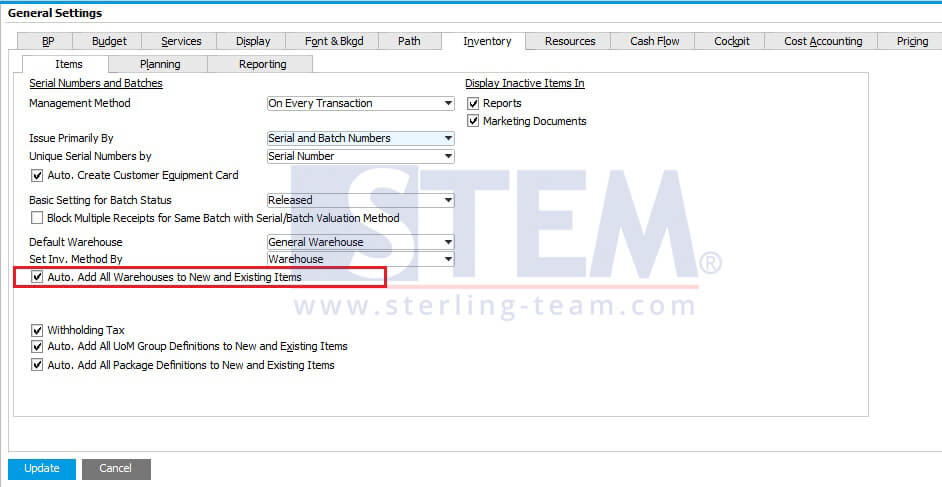
Just tick on option Auto Add All Warehouse to New and Existing Items.
So, your user won’t have a problem when adding new item master data to your new warehouse or when they want to adjust stock position for the new warehouse.
Also read relevant SAP Business One Tips:
- Import Stock Count into SAP Business One Effortlessly
- How to Set Default Warehouse in SAP B1 (Part 2)
- Master Your Warehouse Locations Setup in SAP Business One
- Re-activate Items in SAP Business One – Step-by-Step
- How to Manage Drop Ship Warehouse in SAP B1
- Duplicate SAP Business One Item Master Data Quickly