When you access the Business Partner Master Data window, you will see a button named “You Can Also” in the bottom right corner of the window.
So.. what is the function of it?
SAP Business One provides this button to help you to be faster in creating documents related to the Business Partner which you choose,
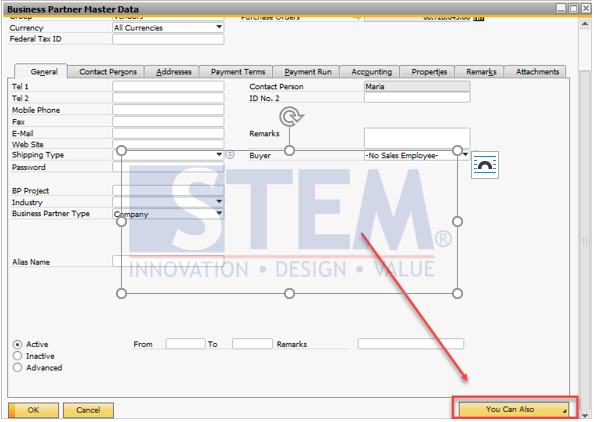
If you click on the button “You Can Also” in the Business Partner Master Data screen, lists of function will appear as seen on the picture below
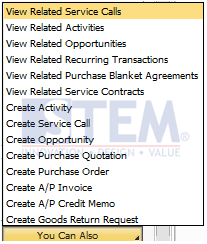
Note: “You Can Also” button also appear in Add Mode, but in Add Mode you will have only create activity because you don’t have specific BP
Also read relevant SAP Business One Tips:
- New Feature: Duplicate Check for Business Partners in SAP Business One 10.0 FP 2508
- Manage Serial Numbers in SAP Business One
- Add Print Time to SAP B1 Crystal Report Layout Easily
- Currency Setup in SAP Business One
- SAP Business One Service Call: Uses & How It Works
- Paper Size Settings in SAP Crystal Reports Guide